Guide updated on October 13, 2026. The original version (July 2026) told the case; this version keeps the case and adds the full procedure: cut-off, count, causes, valuation and exit criteria, with the Odoo 19 menu paths.
View Mermaid diagram
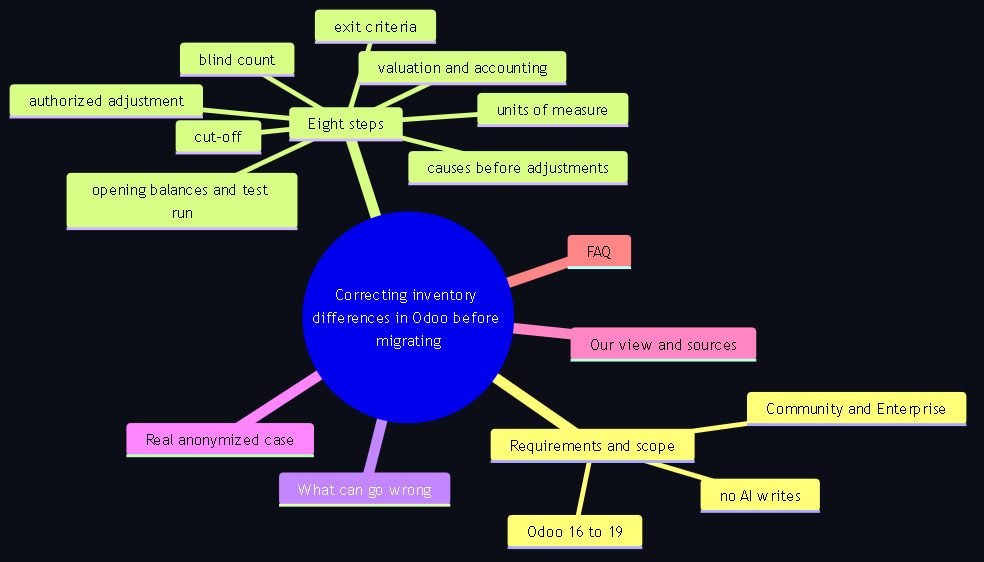
mindmap
  root(("Correcting inventory differences in Odoo before migrating"))
    Requirements and scope
      Community and Enterprise
      Odoo 16 to 19
      no AI writes
    Eight steps
      cut-off
      units of measure
      blind count
      causes before adjustments
      authorized adjustment
      valuation and accounting
      opening balances and test run
      exit criteria
    What can go wrong
    Real anonymized case
    Our view and sources
    FAQ
Migrating a large ERP is not copying a system from one version to another. It also carries over everything that system had wrong. When the base is dirty, the migration does not clean it: it inherits it, makes it more expensive to fix and puts the reassuring label of a "new system" on top. This guide describes how a wholesale distributor of lighting and project furniture in Mexico prepared to upgrade from Odoo 16 to Odoo 19, why the first deliverable was not the migration but the stabilization of its inventory, and the procedure we now apply before any migration of a trading company.
Requirements and scope
| Point | What this guide covers | What it does not cover |
|---|---|---|
| Editions | Community and Enterprise. The Inventory app and the physical inventory exist in both. | Enterprise-only features (for example, quality or advanced barcodes) are not needed for this procedure. |
| Versions | Odoo 16 to 19. The menu paths quoted come from the Odoo 19 documentation; in 16 and 17 the page is called Inventory Adjustments and names may vary. | Versions earlier than 16 (outside the scope of Transgenia's service). |
| Deployment | Odoo Online, Odoo.sh and self-hosted. The procedure is about the interface and judgment, not code. | Data migration scripts and custom module upgrades: that is the next project. |
| What it includes | Stock by product, location, lot or serial; units of measure; valuation and reconciliation with accounting; preparation of opening balances; exit criteria. | Tax treatment of shrinkage and shortages: your accountant defines it. This guide points out where to ask, it does not replace their judgment. |
| Who does it | Warehouse lead, accounting lead and one person who authorizes adjustments. Transgenia accompanies with the method and read-only queries. | It does not require AI to write anything in Odoo. Adjustments are applied by a person. |
Step by step: from the cut-off to the exit criteria
1. Set the cut-off and close what is pending
Define a cut-off date and time and communicate it to purchasing, sales and the warehouse. Before counting, validate or cancel transfers that are ready or partial: supplier receipts not validated, deliveries invoiced but not confirmed in the warehouse and half-done internal transfers. The Odoo 19 documentation warns about it clearly: moves of products can happen between the physical count and the application of the inventory adjustment. If you cannot stop operations during the count, record separately everything that enters or leaves between the count and the application.
2. Audit units of measure and packaging before counting
In wholesale, part of the differences are not shortages: they are pieces counted as boxes, boxes counted as pallets or misconfigured conversions. Check that the purchase unit, the sale unit and the conversion factor of each product match the physical reality. A product sold by whole piece should not show decimals in stock.
3. Count blind against the On Hand column
In Odoo 19, go to Inventory, Operations, Physical Inventory. The page shows, by product and location, the On Hand, Counted and Difference columns. Enter the real count in Counted. Make sure the person counting cannot see the theoretical quantity: a count that "confirms" the system is useless as a diagnosis. In large catalogs, filter by location and request a second count for high-value or high-rotation products. The count stays recorded without being applied; at this stage, the documentation says, the count is registered but not yet applied.
4. Investigate each difference and fix the cause, not the symptom
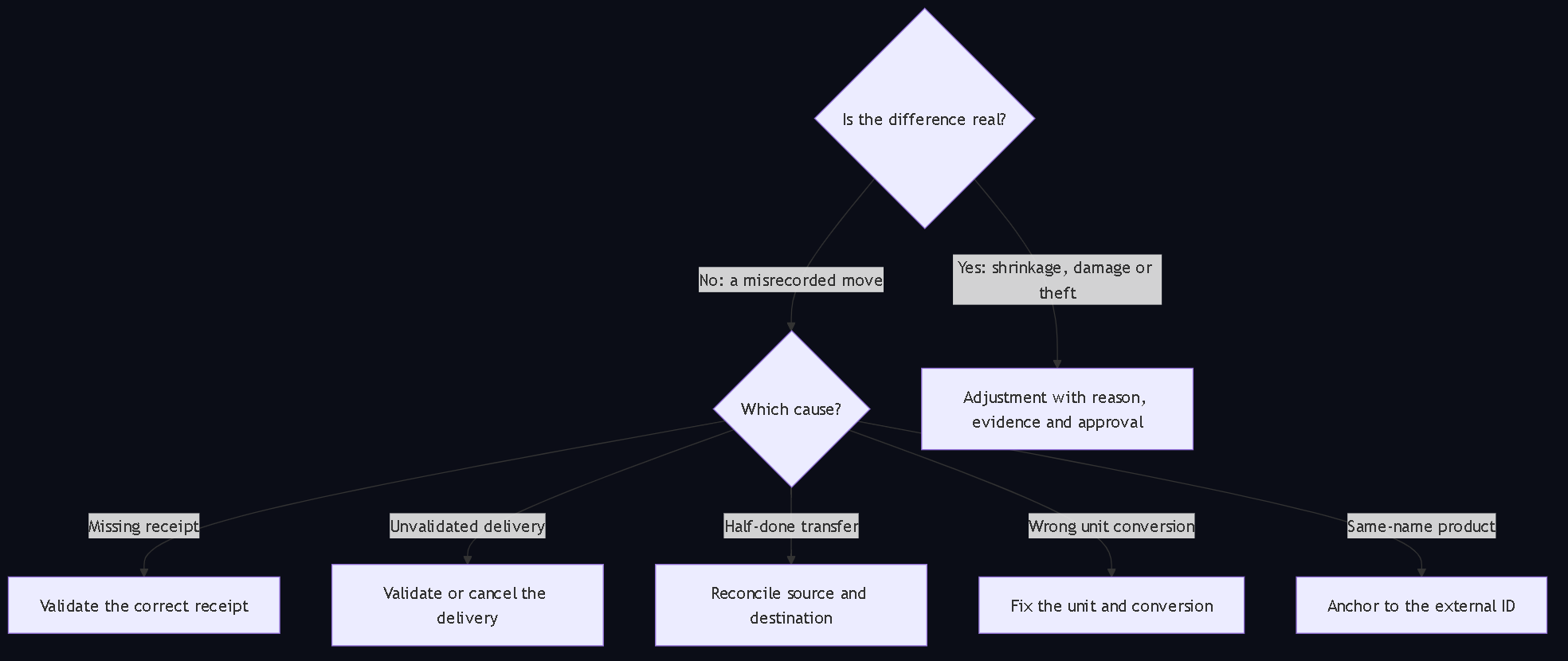
This is the part almost nobody does and the one that separates a cleanup from makeup. Before applying anything, classify each relevant difference by its cause:
| Cause found | Correction in Odoo | Why an adjustment is not enough |
|---|---|---|
| Supplier receipt omitted | Check invoice and delivery note; validate the correct receipt. | A positive adjustment hides an unrecorded purchase and unbalances payables. |
| Delivery invoiced but not validated | Review the real shipment and validate or cancel the move. | A negative adjustment hides a sale with no warehouse exit. |
| Incomplete internal transfer | Reconcile source, destination and transfer state. | The product exists; it is in another location. |
| Product in another location | Record an internal relocation. | It is not a loss. |
| Unit or packaging misconfigured | Fix the unit of measure and the conversion before touching quantities. | The adjustment would repeat the error on every future purchase. |
| Wrong lot or expiry | Reconcile by lot and location. | An adjustment per product breaks traceability. |
| Two products with the same name | Anchor any bulk load to the variant's external ID, never to the name. | Odoo does not know which one to apply the change to, or applies it to the wrong one (see the case). |
| Real shrinkage, damage or theft | Apply the adjustment with reason, evidence and authorization. | It is the only difference that is actually solved with an adjustment. |
View Mermaid diagram
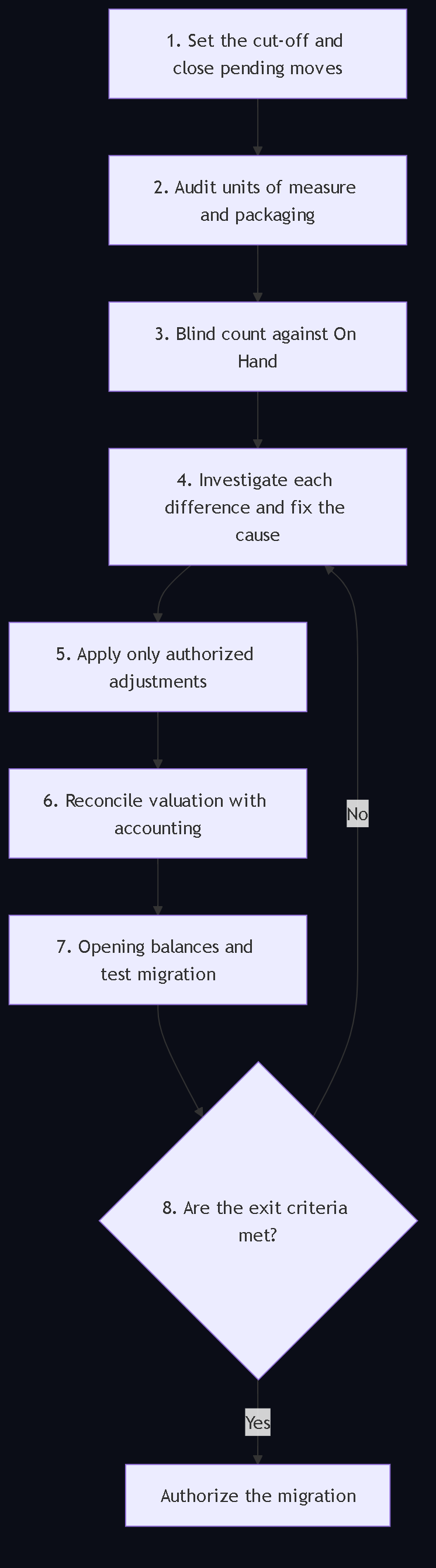
flowchart TB
    P1["1. Set the cut-off and close pending moves"] --> P2["2. Audit units of measure and packaging"]
    P2 --> P3["3. Blind count against On Hand"]
    P3 --> P4["4. Investigate each difference and fix the cause"]
    P4 --> P5["5. Apply only authorized adjustments"]
    P5 --> P6["6. Reconcile valuation with accounting"]
    P6 --> P7["7. Opening balances and test migration"]
    P7 --> P8{"8. Are the exit criteria met?"}
    P8 -- "No" --> P4
    P8 -- "Yes" --> M["Authorize the migration"]
View Mermaid diagram
flowchart TB
    A{"Is the difference real?"}
    A -- "No: a misrecorded move" --> B{"Which cause?"}
    B -- "Missing receipt" --> C1["Validate the correct receipt"]
    B -- "Unvalidated delivery" --> C2["Validate or cancel the delivery"]
    B -- "Half-done transfer" --> C3["Reconcile source and destination"]
    B -- "Wrong unit conversion" --> C4["Fix the unit and conversion"]
    B -- "Same-name product" --> C5["Anchor to the external ID"]
    A -- "Yes: shrinkage, damage or theft" --> D["Adjustment with reason, evidence and approval"]
5. Apply the authorized adjustment
When only real differences remain, apply them from the same page. Odoo asks for confirmation before doing so (as an additional precaution, the documentation says, Odoo requests a confirmation before applying the inventory adjustment) and creates a stock move for the difference. Record the reason, the count reference and who authorized it. Keep the move history before and after.
6. Reconcile valuation with accounting, with your accountant
A correct quantity does not guarantee a correct cost. Odoo values inventory with three methods, configured in the Accounting settings and, optionally, per product category:
- Standard cost. Fixed unit cost, updated manually. Simple, but drifts if supplier prices move.
- Average cost (AVCO). Weighted average of all units. Stable with multiple purchases; common in fast rotation.
- FIFO. First in, first out; the original cost travels with the sale. Useful for traceability by lot.
Compare the inventory valuation report with the inventory accounts in the ledger at the cut-off date; review negative stock, incorrect purchase costs and moves with pending valuation. Two warnings that matter in a 16 to 19 migration: removal strategies only affect which product is picked first, not the valuation method; and since Odoo 19 the perpetual method impacts the stock valuation account at the invoice level, whereas before 19 it was posted at each stock movement. In other words, the accounting reconciliation is not inherited the same way when you change version. In Mexico, the accounting and tax treatment of shrinkage, shortages and overages is defined by the accounting lead; the Odoo documentation also recommends consulting them before touching valuation.
7. Prepare opening balances and run a test migration
With the inventory reconciled: freeze and document the cut-off; clean the catalog (duplicates, barcodes, conversions); export stock and costs by product, location, lot and serial; import a representative sample into the test database of the new version and compare units and values; test purchases, sales, returns and transfers. Keep backups, reconciliation reports, approvals and a rollback procedure.
8. Exit criteria: do not migrate until they are met
- 100% of active SKUs have a reconciled quantity or a documented exception.
- There are no unexplained differences in high-value products.
- Negative stock is justified and resolved.
- Lots, expiry dates and serial numbers match the physical reality.
- Valuation reconciles with accounting or the remaining differences have formal approval.
- Goods in transit, returns and third-party goods are identified.
- The test migration produces the same unit and value totals as the approved inventory.
What can go wrong
- Adjusting first and asking later. A bulk adjustment "so it balances" hides receipts, deliveries and transfers that were misrecorded, and carries the error to the new version with a better interface.
- Counting without a cut-off. Without a date and time of cut-off, every later move reopens the difference.
- Loading by name. Large catalogs have same-name products; a bulk load by name applies the adjustment to the wrong record.
- Changing the costing method in the middle of the cleanup. With average cost or FIFO, moves and adjustments change the stock value; changing the method without analyzing the effect creates new imbalances.
- Inheriting the accounting logic of the old version. Perpetual valuation changed place in Odoo 19; reconciling "as always" leaves differences nobody understands.
- Forgetting the scheduled date. If no other date is specified, the annual inventory stays on December 31; it is changed in Inventory, Configuration, Settings, in Annual Inventory Day and Month.
The real case: when costing lies
What follows are the real figures of a wholesale distributor's diagnosis, anonymized, as published in July 2026. None was estimated or rounded.
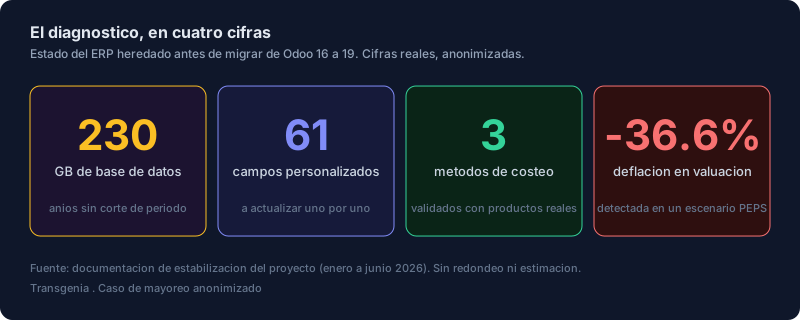
The starting point was an ERP with history: a 230 GB database, swollen by years of transactions without period cut-offs; 61 custom fields that would have to be upgraded one by one so they would not break in the new version; and about 29,000 lines of Python and 12,000 of XML of accumulated customizations. The most common advice when a version approaches end of support is direct: upgrade. But "just upgrade" assumes that what moves over is healthy.
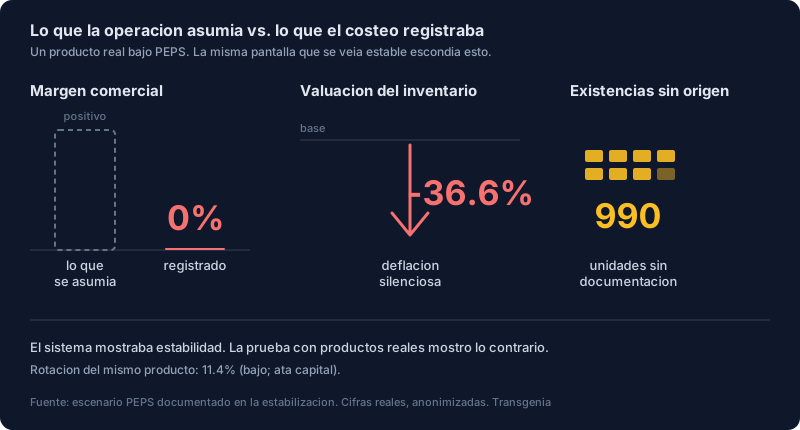
Before touching the version, we put the numbers to the test. A wholesale distributor lives on a thin margin; if the system miscalculates the cost of what it sells, the company sets prices on a reality that does not exist. Three scenarios were documented, one per costing method, with real products from the catalog. In the FIFO scenario, on a real acoustic treatment product, the numbers told a story the operation had not noticed:
- Commercial margin of 0%. A sale that, according to the system's own costing, left no profit.
- Deflation of -36.6% in the inventory valuation of that product.
- Rotation of 11.4%, very low: product that moves little and ties up capital.
- 990 units with no clear origin documentation.
The cure was not to reimplement: it was to stabilize. A central piece was the bulk adjustment done the right way. In a wholesale catalog with thousands of references, two products can have the same name and be different. If you try to adjust by name, Odoo does not know which one to apply the change to, or applies it to the wrong one.
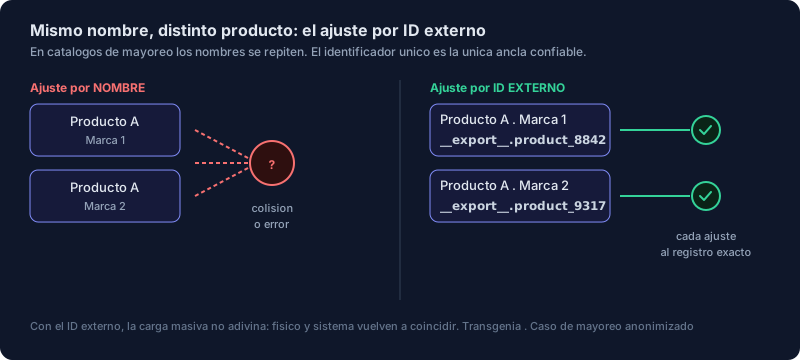
The solution was to anchor each adjustment to the unique external ID of each variant, not to its name. With that anchor, the bulk load stops guessing: each counted quantity lands on the correct variant, with its date and location. Physical stock and system stock match again, which is the minimum condition for any later costing to mean anything. Only then did it make sense to talk about Odoo 19.
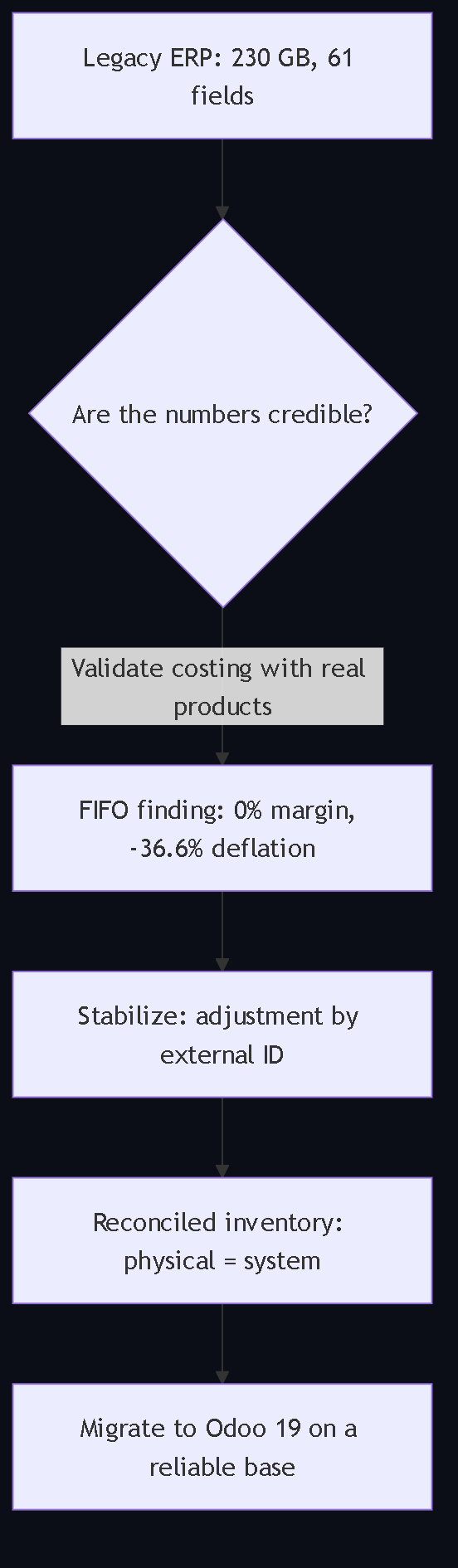
View Mermaid diagram
flowchart TB
    A["Legacy ERP: 230 GB, 61 fields"] --> B{"Are the numbers credible?"}
    B -- "Validate costing with real products" --> C["FIFO finding: 0% margin, -36.6% deflation"]
    C --> D["Stabilize: adjustment by external ID"]
    D --> E["Reconciled inventory: physical = system"]
    E --> F["Migrate to Odoo 19 on a reliable base"]
What we think at Transgenia
- Upgrading and cleaning up are two projects, and the cleanup goes first. End of support forces you to migrate; it does not force you to migrate the mess.
- A 0% margin is an alarm, not a data point. When the system reports it, costing has lost the thread.
- The adjustment is the last step. First the moves and the causes; then the authorized adjustments; finally the accounting reconciliation and the definitive cut-off.
- AI comes in read-only. For this procedure we use read-only queries on Odoo (our MCP server refuses every write when it is in that mode); adjustments are applied by an authorized person. We do not sell agents that fix inventories on their own.
- Migrate when the base tells the truth, not when the calendar presses. A migration on distorted data costs more to fix afterwards than to stabilize before.
Sources
Every technical fact in this guide rests on a public source. The case figures are Transgenia's and are labeled as such.
- Odoo 19, Inventory adjustments (Spanish documentation): the Inventory, Operations, Physical Inventory path, the On Hand, Counted and Difference columns, confirmation before applying, stock move on application and the warning about moves between the count and the application.
- Odoo 19, Valuation cheat sheet: three costing methods configured in Accounting and per category; definitions of standard cost, AVCO and FIFO; removal strategies without effect on valuation; the perpetual method moving to the invoice level since Odoo 19.
- Odoo 17, Inventory valuation configuration: recommendation to consult an accountant before configuring automatic valuation.
- Odoo 19, Valuation of stock movements and inventory operations: how moves and adjustments are valued under each method.
- MCP-Odoo-Tools repository (MIT): read-only mode that refuses every write tool before anything reaches Odoo.
- Stabilization documentation of the real wholesale project (January to June 2026), Transgenia's internal source: case figures, anonymized.
Frequently asked questions
What is an inventory adjustment in Odoo and when should I use it?
It is the record that aligns the system quantity with the counted quantity. When applied, Odoo creates a stock move for the difference. Use it only for real differences (shrinkage, damage, theft) after fixing misrecorded receipts, deliveries and transfers; using it earlier hides the cause.
Where is the physical inventory in Odoo 19?
In Inventory, Operations, Physical Inventory. The page shows, by product and location, the On Hand, Counted and Difference columns. In Odoo 16 and 17 the page is called Inventory Adjustments and column names may vary.
Do I have to stop operations to count?
Ideally you set a cut-off date and time and validate or cancel pending moves before counting. If you cannot stop operations, record separately every receipt, delivery and transfer that happens between the count and the application: the Odoo documentation warns that those moves can happen and create new differences.
Why does the inventory not balance if I just counted?
The most frequent causes in wholesale are misconverted units of measure or packaging, unvalidated receipts, deliveries invoiced without a warehouse exit, half-done transfers and same-name products loaded by name. Each one is fixed differently; a global adjustment covers them all and fixes none.
What is the difference between standard cost, average cost and FIFO in Odoo?
Standard cost is a fixed unit cost updated manually; average cost (AVCO) is the weighted average of all units; FIFO is first in, first out. They are configured in the Accounting settings and, optionally, per product category. The right choice depends on each product family, and changing it in the middle of the cleanup creates new imbalances.
How do I reconcile inventory valuation with accounting before migrating?
Compare the valuation report with the inventory accounts of the ledger at the cut-off date; review negative stock, incorrect purchase costs and moves with pending valuation; document and approve the necessary entries with your accountant. Since Odoo 19 the perpetual method impacts the valuation account at the invoice level, not at each move as before.
Can I do the bulk adjustment with an import?
Yes, as long as each line is anchored to the variant's external ID and not to its name. Large catalogs have products with the same commercial name and a different brand; a load by name applies the adjustment to the wrong record. In the real case of this guide that anchor was the central piece of the cleanup.
What criteria must the inventory meet before loading opening balances in the new Odoo?
Reconciled quantities or a documented exception on 100% of active SKUs; no unexplained differences in high-value products; negative stock resolved; lots and expiry dates verified; valuation reconciled or differences approved; goods in transit and third-party goods identified; and a test migration with the same unit and value totals.
Is correcting inventory different in Odoo Community than in Enterprise?
Not for this procedure. The Inventory app, the physical inventory, adjustments and valuation exist in both editions. Edition differences appear in other integrations, not in the cleanup before migrating.
Do I have to stabilize inventory in Odoo 16 before migrating to Odoo 19?
Yes. The new version does not fix badly founded costing; it inherits it with a better look. In addition, the logic of perpetual valuation changed in Odoo 19, so it is best to reach the migration with quantities and values reconciled in the source version.
What role does AI play in this procedure?
Read-only queries: reading stock, pending moves and valuation to prepare the diagnosis and the checklists. Corrections and adjustments are applied by an authorized person. Our MCP server for Odoo has a read-only mode that refuses any write.
How long does it take to stabilize a distributor's inventory before migrating?
It depends on the size of the catalog, the number of warehouses, whether there are lots or serials and the state of accounting. We do not publish timelines or figures that do not come from a documented project; the case in this guide ran from January to June 2026 within a larger migration project.
Next step
If your distributor or trading company runs Odoo and is thinking about migrating versions, first review the Odoo for trading companies page, where the inventory, WhatsApp orders and AI quotation guides are gathered, and then request an assessment: we bring the stabilization method and the judgment of when it is, or is not, time to migrate yet.
About the author and Transgenia
Efraín Carreón Ortiz is CEO of Centrum Transgenia, a Mexican technology boutique. He holds the official Claude Code badge (Claude Partner Badge) issued by Anthropic, verifiable on Credly.
Transgenia is an OpenAI Select Partner within the OpenAI Partner Network and a registered partner in Anthropic's Claude Partner Network. Team: Víctor Estrada Bello, Chief PMO; Danild Johan Zambrana López, Chief Technology Officer; Jaime Lozano Castañeda, Chief Marketing Officer; Efraín Carreón Ortiz, Director General (Chief Executive Officer).
Let's talk: contacto@transgenia.org, WhatsApp +52 55 8034 0405, 15-minute call or the contact page.
Keep reading
- Odoo for B2B trading companies: the vertical hub, with the three guides and what to prepare before an assessment.
- How to integrate AI with Odoo to prepare quotations that a person approves: the governed flow on top of an inventory you can already trust.
- How to connect WhatsApp orders to Odoo with AI: from the message to the draft quotation.
- Who integrates Claude or ChatGPT with Odoo in Mexico?: criteria to hire any integrator.
- AI implementation and Odoo integration: the offer and the assessment form.
Note on accuracy and privacy
The case figures (230 GB database, 61 custom fields, about 29,000 lines of Python and 12,000 of XML, and in a FIFO costing scenario: 0% margin, -36.6% deflation, 11.4% rotation and 990 units with no documented origin) come from the stabilization documentation of a real wholesale project executed between January and June 2026. No figure was estimated or rounded. The client is presented anonymously: neither the company, its brands, its suppliers nor the people involved are named. No personal data was read or quoted; only operational aggregates. The Odoo documentation quotes correspond to version 19.0 consulted on October 12, 2026.