You've been hearing for months that "AI can talk to your ERP." What nobody explains is that Odoo renamed dozens of models between version 12 and 19, and that an MCP server that doesn't handle this at runtime will silently mislead the agent. Here is what we built to solve it, why we published it under MIT, and what we intentionally left out.
account.invoice → account.move in v13). It ships as a Claude Code plugin, runs on python3 with no external dependencies, and the source code is published on GitHub under the MIT license.
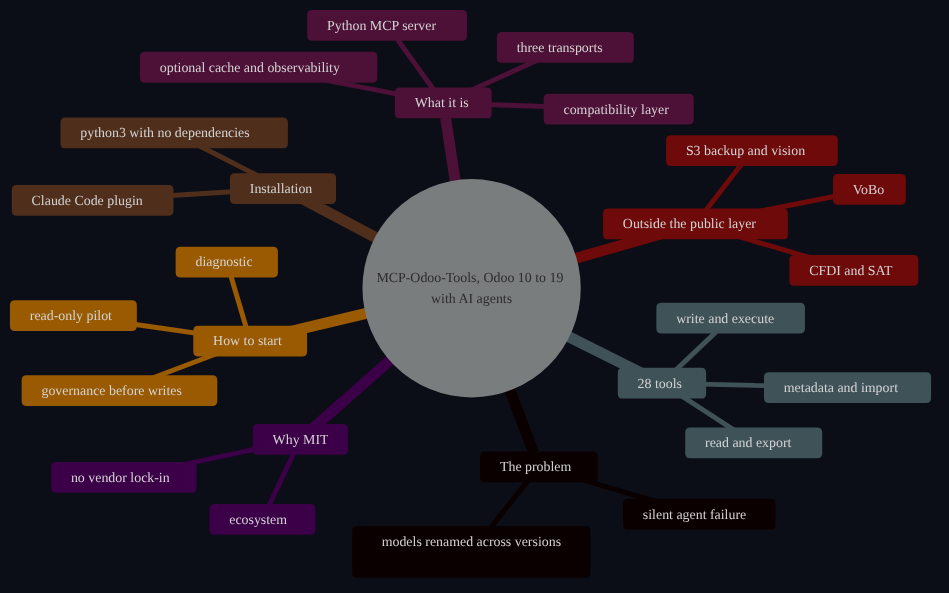
View Mermaid diagram
%%{init: {'theme': 'dark', 'themeVariables': {'primaryColor': '#1a2035', 'primaryTextColor': '#FFFFFF', 'primaryBorderColor': '#FBA225', 'lineColor': '#FBA225', 'background': '#0B0D17', 'mainBkg': '#0E1220', 'fontFamily': 'Inter, Arial, sans-serif', 'fontSize': '14px'}}}%%
mindmap
  root(("MCP-Odoo-Tools, Odoo 10 to 19 with AI agents"))
    The problem
      models renamed across versions
      silent agent failure
    What it is
      Python MCP server
      compatibility layer
      three transports
      optional cache and observability
    28 tools
      read and export
      write and execute
      metadata and import
    Installation
      Claude Code plugin
      python3 with no dependencies
    Outside the public layer
      CFDI and SAT
      VoBo
      S3 backup and vision
    Why MIT
      no vendor lock-in
      ecosystem
    How to start
      diagnostic
      read-only pilot
      governance before writes
The real problem: Odoo model names change across versions
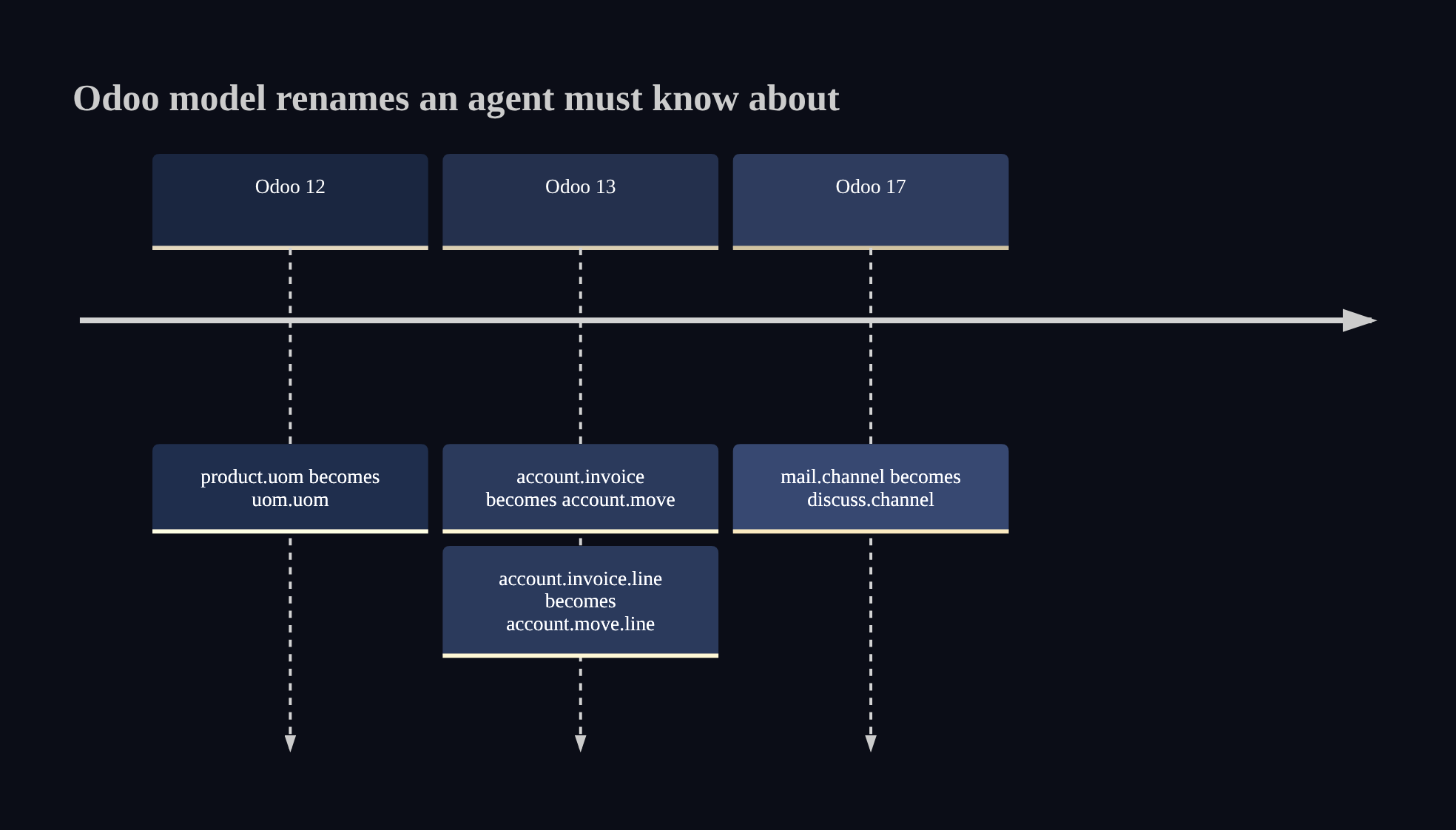
Odoo is the most widely adopted ERP among SMEs in Latin America, but it comes with a detail that consultants rarely mention before the contract is signed: every major version reorganizes or renames models and fields. The most well-known example is account.invoice, which became account.move in Odoo 13. There are dozens of similar changes between versions 10 and 19.
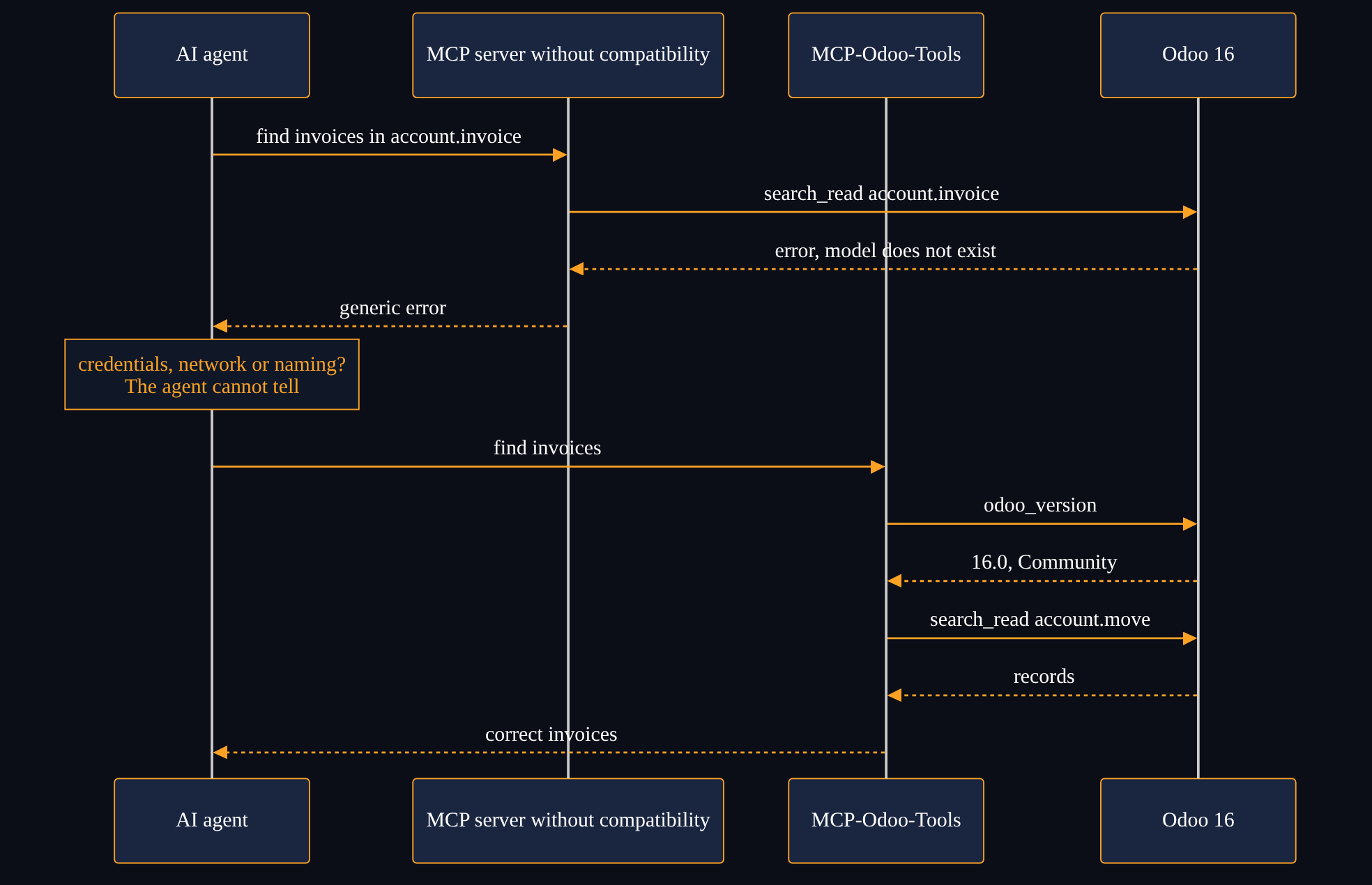
For a human who knows the history, this is a learning curve. For an AI agent, it is a silent failure point: the agent calls the old model name with confidence, the ERP returns an error that looks like a permissions or network issue, and the agent cannot distinguish a credentials problem from a nomenclature problem.
We could have built an MCP server that assumes Odoo 19 and called it done. But that would exclude thousands of businesses running perfectly functional version 14, 16 or 17 deployments with no reason to migrate just because AI arrived.
View Mermaid diagram
%%{init: {'theme': 'dark', 'themeVariables': {'primaryColor': '#1a2035', 'primaryTextColor': '#FFFFFF', 'primaryBorderColor': '#FBA225', 'lineColor': '#FBA225', 'background': '#0B0D17', 'mainBkg': '#0E1220', 'fontFamily': 'Inter, Arial, sans-serif', 'fontSize': '14px', 'titleColor': '#FBA225', 'cScale0': '#1a2640', 'cScale1': '#24304d', 'cScale2': '#2e3c5e', 'cScaleLabel0': '#FFFFFF', 'cScaleLabel1': '#FFFFFF', 'cScaleLabel2': '#FFFFFF'}}}%%
timeline
    title Odoo model renames an agent must know about
    Odoo 12 : product.uom becomes uom.uom
    Odoo 13 : account.invoice becomes account.move
            : account.invoice.line becomes account.move.line
    Odoo 17 : mail.channel becomes discuss.channel
View Mermaid diagram
%%{init: {'theme': 'dark', 'themeVariables': {'primaryColor': '#1a2035', 'primaryTextColor': '#FFFFFF', 'primaryBorderColor': '#FBA225', 'lineColor': '#FBA225', 'background': '#0B0D17', 'mainBkg': '#0E1220', 'fontFamily': 'Inter, Arial, sans-serif', 'fontSize': '14px', 'actorTextColor': '#FFFFFF', 'actorBkg': '#1a2640', 'actorBorder': '#FBA225', 'signalColor': '#FBA225', 'signalTextColor': '#FFFFFF', 'labelBoxBkgColor': '#101828', 'labelBoxBorderColor': '#FBA225', 'labelTextColor': '#FBA225', 'noteBkgColor': '#101828', 'noteTextColor': '#FBA225', 'noteBorderColor': '#FBA225'}}}%%
sequenceDiagram
    participant A as AI agent
    participant S as MCP server without compatibility
    participant C as MCP-Odoo-Tools
    participant O as Odoo 16
    A->>S: find invoices in account.invoice
    S->>O: search_read account.invoice
    O-->>S: error, model does not exist
    S-->>A: generic error
    Note over A: credentials, network or naming?
The agent cannot tell
    A->>C: find invoices
    C->>O: odoo_version
    O-->>C: 16.0, Community
    C->>O: search_read account.move
    O-->>C: records
    C-->>A: correct invoices
What MCP-Odoo-Tools is
MCP-Odoo-Tools is a Python server that implements the Model Context Protocol (MCP, published by Anthropic as an open standard) on top of Odoo. The source code is published on GitHub under the MIT license. It is a clean-room implementation (not derived from any AGPL fork) and it ships packaged as a Claude Code plugin.
What distinguishes it from a basic Odoo integration:
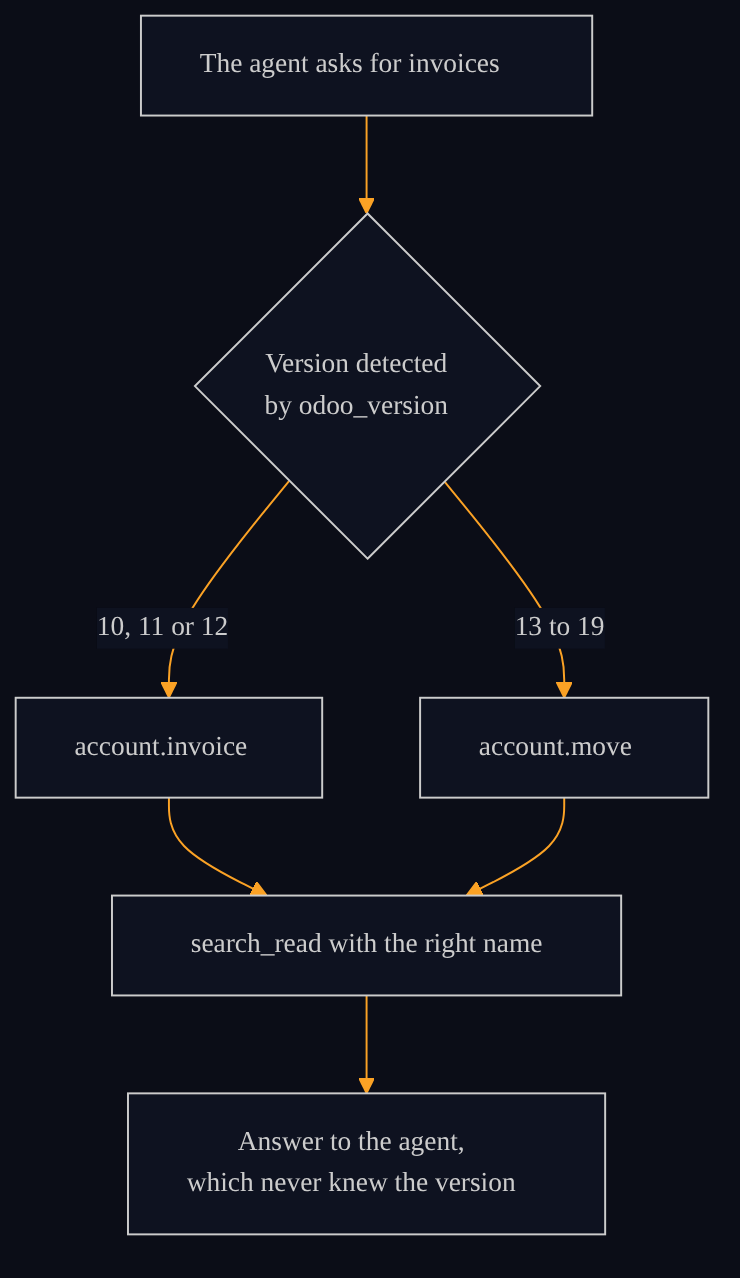
Cross-version compatibility layer. A declarative map covers model and field name differences from Odoo 10 through 19. When an agent requests invoice data, the layer determines at runtime whether the connected instance uses account.invoice or account.move, without the agent or the operator needing to know the version in advance.
Automatic version and edition detection. The server identifies the exact Odoo version (CE, EE or online), edition and deployment mode at connection time. That information feeds the compatibility layer and the transport selector.
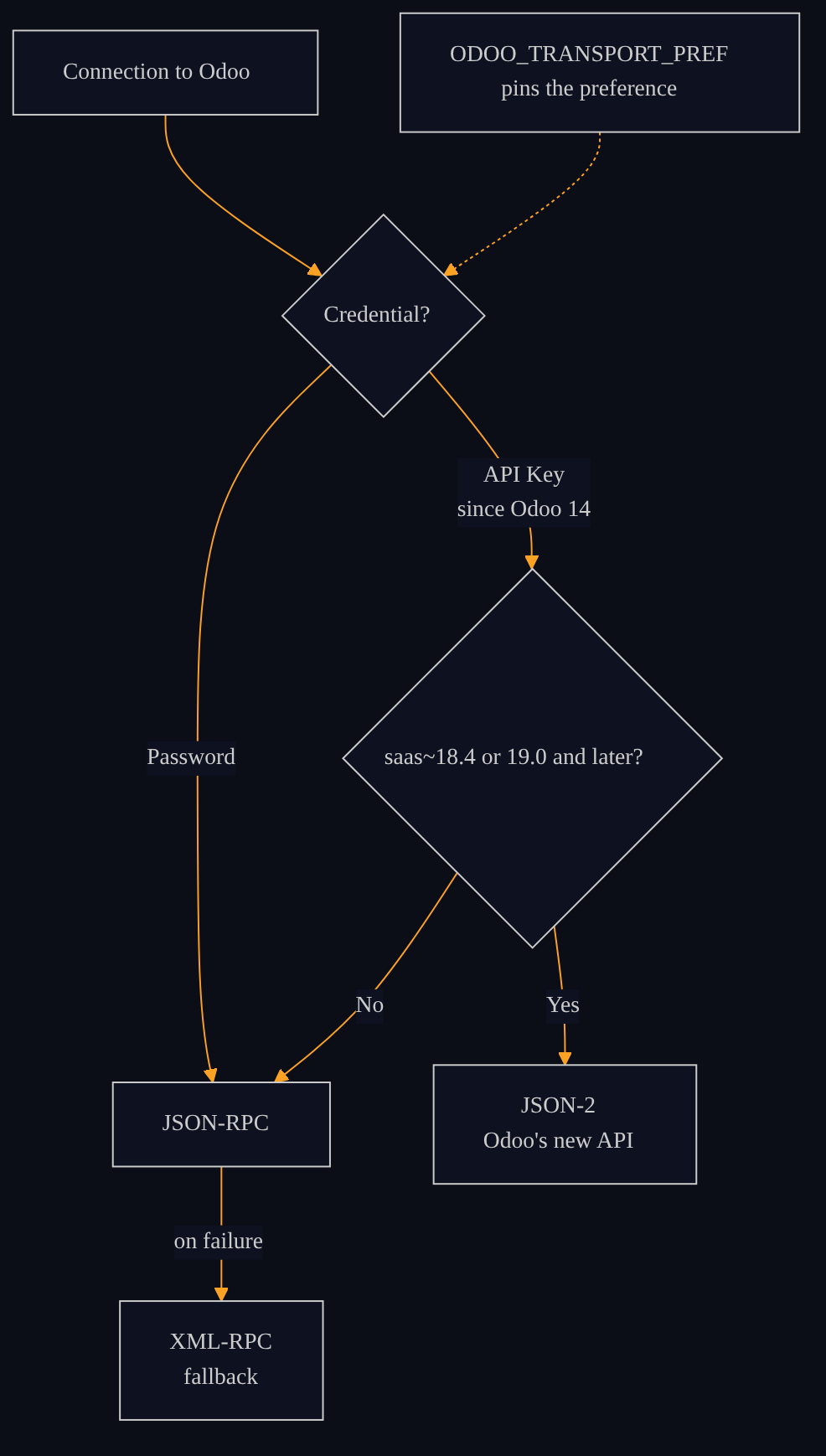
Three transports, selected automatically. The server picks the transport from the detected version and the credential: JSON-2 (Odoo's new API, available on saas~18.4 and 19.0+) when an API Key is set, and JSON-RPC with XML-RPC fallback elsewhere. JSON-RPC and XML-RPC accept a password or an API Key (API Keys exist since Odoo 14); JSON-2 accepts API Keys only. The preference can be pinned with ODOO_TRANSPORT_PREF.
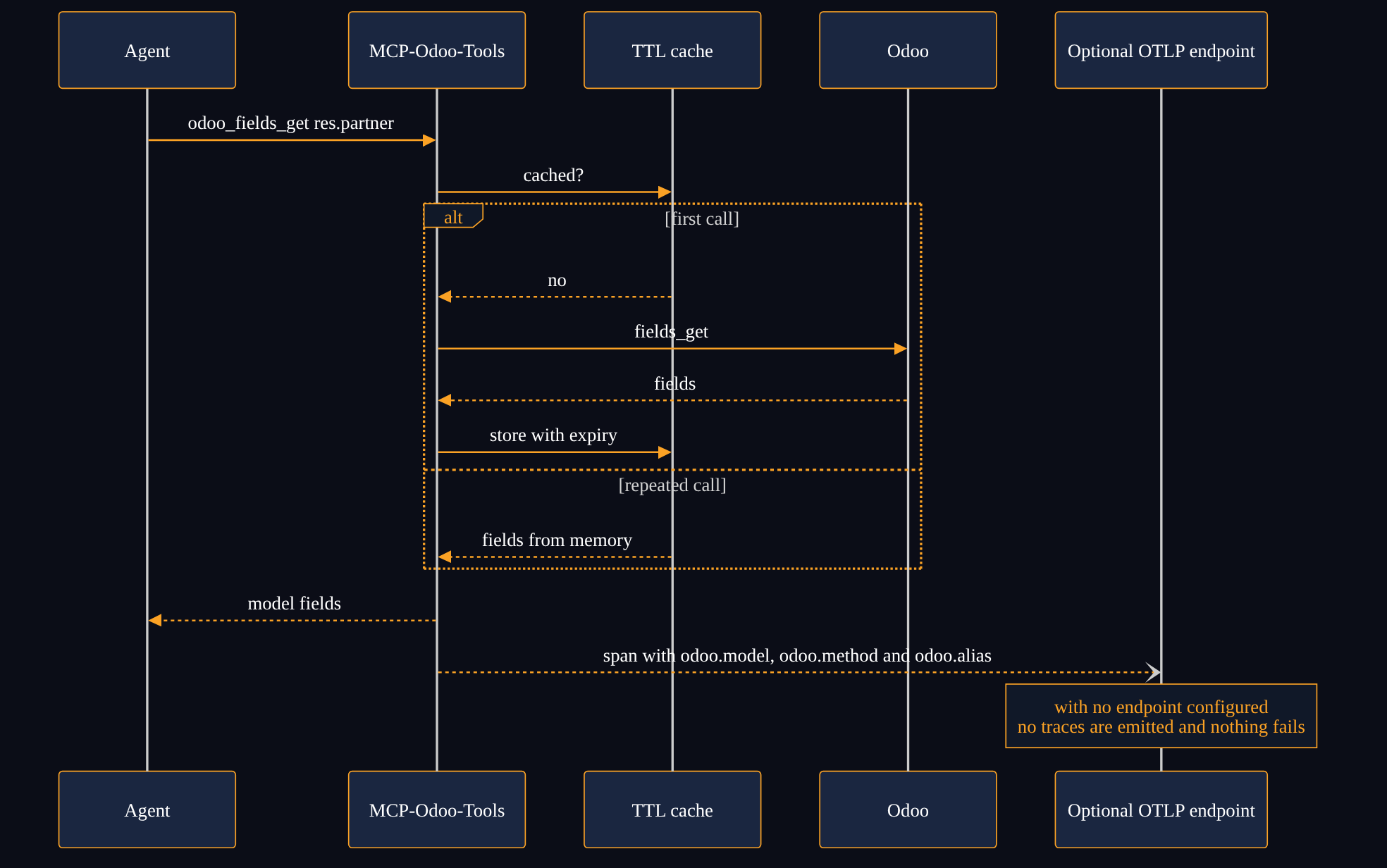
Optional schema cache. Repeated calls to odoo_fields_get are served from memory (configurable TTL cache), reducing latency in intensive work sessions.
Built-in observability (optional). Each RPC call produces an OpenTelemetry span with odoo.model, odoo.method and odoo.alias attributes. If no OTLP endpoint is configured, the server starts normally without emitting traces: graceful degradation, zero errors.

View Mermaid diagram
%%{init: {'theme': 'dark', 'themeVariables': {'primaryColor': '#1a2035', 'primaryTextColor': '#FFFFFF', 'primaryBorderColor': '#FBA225', 'lineColor': '#FBA225', 'background': '#0B0D17', 'mainBkg': '#0E1220', 'fontFamily': 'Inter, Arial, sans-serif', 'fontSize': '14px', 'edgeLabelBackground': '#0E1220', 'clusterBkg': '#101828', 'clusterBorder': '#FBA225'}}}%%
flowchart LR
    A["AI agent
Claude, Gemini, Mistral or another MCP client"] --> M["MCP client
Claude Code or another MCP client"]
    M -->|stdio| S["MCP-Odoo-Tools
Python server, MIT license"]
    S --> D["Version, edition and
deployment detection"]
    D --> K["Compatibility layer
Odoo 10 to 19"]
    K --> T["Transport selector
JSON-2, JSON-RPC, XML-RPC"]
    T --> O["Odoo
Community, Enterprise or online"]
View Mermaid diagram
%%{init: {'theme': 'dark', 'themeVariables': {'primaryColor': '#1a2035', 'primaryTextColor': '#FFFFFF', 'primaryBorderColor': '#FBA225', 'lineColor': '#FBA225', 'background': '#0B0D17', 'mainBkg': '#0E1220', 'fontFamily': 'Inter, Arial, sans-serif', 'fontSize': '14px', 'edgeLabelBackground': '#0E1220', 'clusterBkg': '#101828', 'clusterBorder': '#FBA225'}}}%%
flowchart TD
    Q["The agent asks for invoices"] --> V{"Version detected
by odoo_version"}
    V -->|"10, 11 or 12"| I["account.invoice"]
    V -->|"13 to 19"| M["account.move"]
    I --> R["search_read with the right name"]
    M --> R
    R --> A["Answer to the agent,
which never knew the version"]
View Mermaid diagram
%%{init: {'theme': 'dark', 'themeVariables': {'primaryColor': '#1a2035', 'primaryTextColor': '#FFFFFF', 'primaryBorderColor': '#FBA225', 'lineColor': '#FBA225', 'background': '#0B0D17', 'mainBkg': '#0E1220', 'fontFamily': 'Inter, Arial, sans-serif', 'fontSize': '14px', 'edgeLabelBackground': '#0E1220', 'clusterBkg': '#101828', 'clusterBorder': '#FBA225'}}}%%
flowchart TD
    S["Connection to Odoo"] --> C{"Credential?"}
    C -->|"API Key
since Odoo 14"| V{"saas~18.4 or 19.0 and later?"}
    C -->|"Password"| J["JSON-RPC"]
    V -->|"Yes"| J2["JSON-2
Odoo's new API"]
    V -->|"No"| J
    J -->|"on failure"| X["XML-RPC
fallback"]
    P["ODOO_TRANSPORT_PREF
pins the preference"] -.-> C
View Mermaid diagram
%%{init: {'theme': 'dark', 'themeVariables': {'primaryColor': '#1a2035', 'primaryTextColor': '#FFFFFF', 'primaryBorderColor': '#FBA225', 'lineColor': '#FBA225', 'background': '#0B0D17', 'mainBkg': '#0E1220', 'fontFamily': 'Inter, Arial, sans-serif', 'fontSize': '14px', 'actorTextColor': '#FFFFFF', 'actorBkg': '#1a2640', 'actorBorder': '#FBA225', 'signalColor': '#FBA225', 'signalTextColor': '#FFFFFF', 'labelBoxBkgColor': '#101828', 'labelBoxBorderColor': '#FBA225', 'labelTextColor': '#FBA225', 'noteBkgColor': '#101828', 'noteTextColor': '#FBA225', 'noteBorderColor': '#FBA225'}}}%%
sequenceDiagram
    participant A as Agent
    participant S as MCP-Odoo-Tools
    participant C as TTL cache
    participant O as Odoo
    participant T as Optional OTLP endpoint
    A->>S: odoo_fields_get res.partner
    S->>C: cached?
    alt first call
        C-->>S: no
        S->>O: fields_get
        O-->>S: fields
        S->>C: store with expiry
    else repeated call
        C-->>S: fields from memory
    end
    S-->>A: model fields
    S--)T: span with odoo.model, odoo.method and odoo.alias
    Note over T: with no endpoint configured
no traces are emitted and nothing fails
Available tools
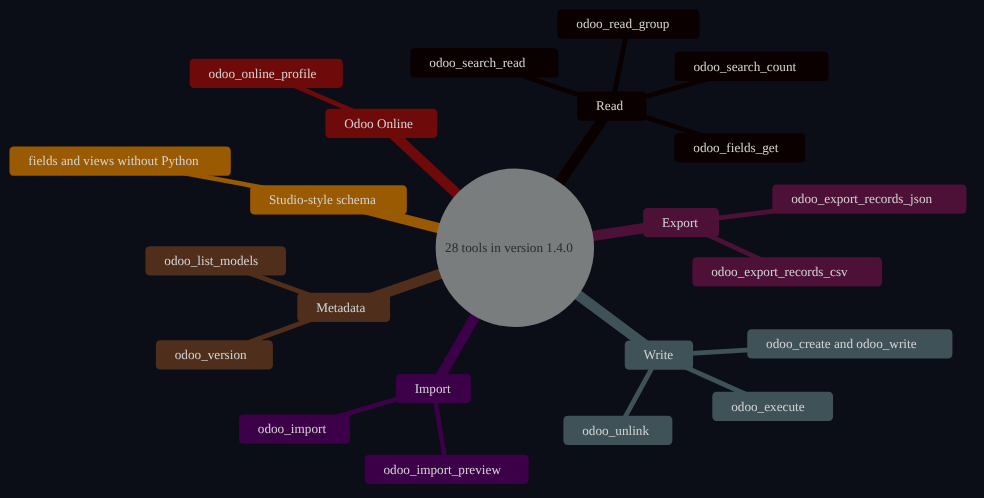
The server exposes 28 tools (version 1.4.0) organized by operation domain:
| Category | Tool | What it does |
|---|---|---|
| Read | odoo_search_read | Search and return records with ORM filters |
| Read | odoo_fields_get | Describe a model's fields (with optional cache) |
| Read | odoo_search_count | Count records without fetching data |
| Export | odoo_export_records_json | Export records via ORM respecting permissions |
| Export | odoo_export_records_csv | Same in CSV format |
| Write | odoo_create / odoo_write | Create or update records |
| Write | odoo_unlink | Delete records |
| Write | odoo_execute | Call any model method |
| Read | odoo_read_group | Group and aggregate records by field |
| Metadata | odoo_version | Return the instance version and edition |
| Metadata | odoo_list_models | List installed models |
| Odoo Online | odoo_online_profile | Series, deployment, transport, keys and plan limits in one read |
| Import | odoo_import_preview / odoo_import | Dry-run and atomic imports with Odoo's own importer |
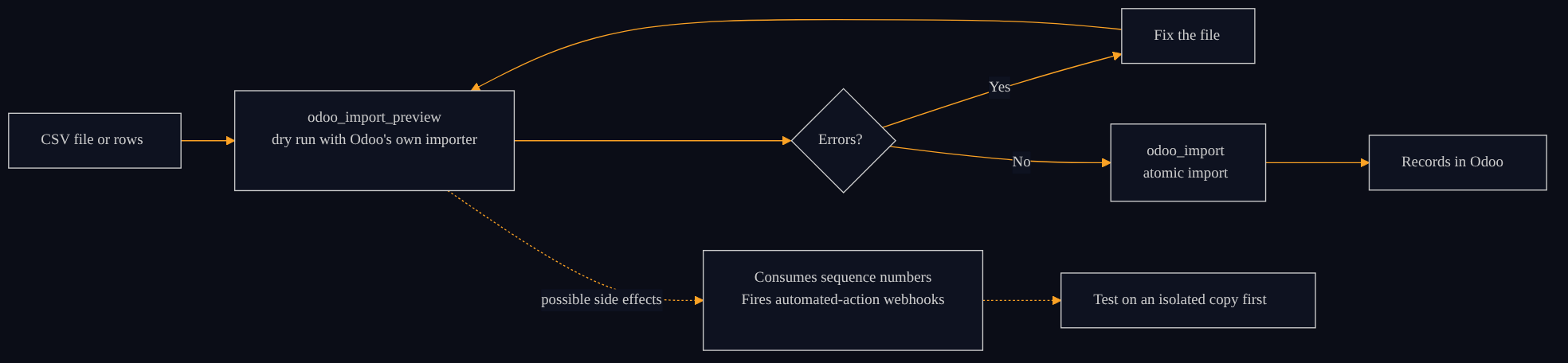
The preview does not save imported rows, but it can consume sequence numbers and fire automated-action webhooks. Test it on an isolated copy before using it in production.
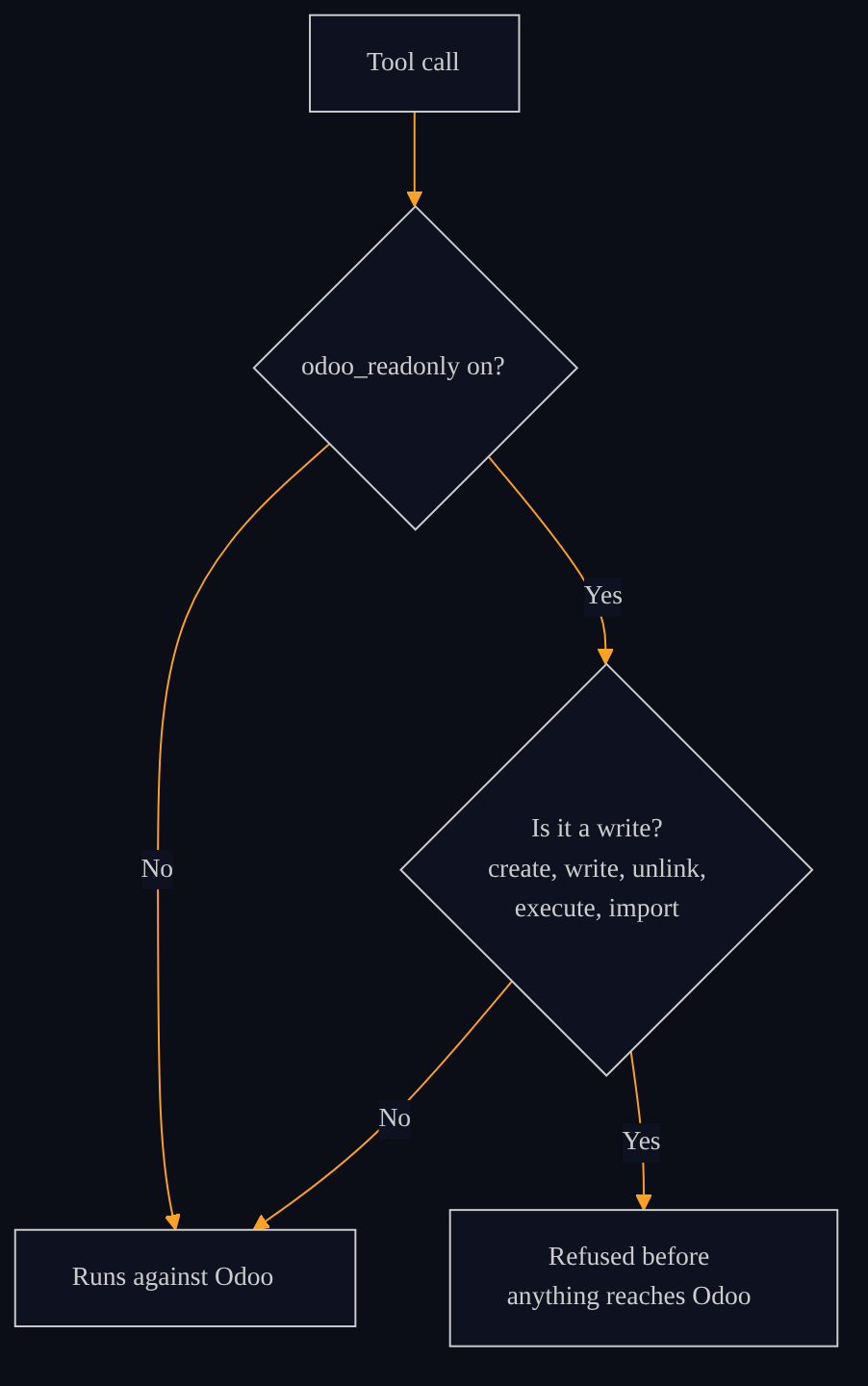
The 28 tools in version 1.4.0 cover connection, read, export, write, Studio-style schema changes and imports. With Read-only mode on, the server refuses every write tool before anything reaches Odoo. The table shows the most commonly used; the full catalog is in the repository README.
View Mermaid diagram
%%{init: {'theme': 'dark', 'themeVariables': {'primaryColor': '#1a2035', 'primaryTextColor': '#FFFFFF', 'primaryBorderColor': '#FBA225', 'lineColor': '#FBA225', 'background': '#0B0D17', 'mainBkg': '#0E1220', 'fontFamily': 'Inter, Arial, sans-serif', 'fontSize': '14px'}}}%%
mindmap
  root(("28 tools in version 1.4.0"))
    Read
      odoo_search_read
      odoo_fields_get
      odoo_search_count
      odoo_read_group
    Export
      odoo_export_records_json
      odoo_export_records_csv
    Write
      odoo_create and odoo_write
      odoo_unlink
      odoo_execute
    Metadata
      odoo_version
      odoo_list_models
    Odoo Online
      odoo_online_profile
    Import
      odoo_import_preview
      odoo_import
    Studio-style schema
      fields and views without Python
View Mermaid diagram
%%{init: {'theme': 'dark', 'themeVariables': {'primaryColor': '#1a2035', 'primaryTextColor': '#FFFFFF', 'primaryBorderColor': '#FBA225', 'lineColor': '#FBA225', 'background': '#0B0D17', 'mainBkg': '#0E1220', 'fontFamily': 'Inter, Arial, sans-serif', 'fontSize': '14px', 'edgeLabelBackground': '#0E1220', 'clusterBkg': '#101828', 'clusterBorder': '#FBA225'}}}%%
flowchart LR
    F["CSV file or rows"] --> P["odoo_import_preview
dry run with Odoo's own importer"]
    P --> R{"Errors?"}
    R -->|"Yes"| C["Fix the file"] --> P
    R -->|"No"| I["odoo_import
atomic import"]
    I --> O["Records in Odoo"]
    P -.->|"possible side effects"| W["Consumes sequence numbers
Fires automated-action webhooks"]
    W -.-> S["Test on an isolated copy first"]
View Mermaid diagram
%%{init: {'theme': 'dark', 'themeVariables': {'primaryColor': '#1a2035', 'primaryTextColor': '#FFFFFF', 'primaryBorderColor': '#FBA225', 'lineColor': '#FBA225', 'background': '#0B0D17', 'mainBkg': '#0E1220', 'fontFamily': 'Inter, Arial, sans-serif', 'fontSize': '14px', 'edgeLabelBackground': '#0E1220', 'clusterBkg': '#101828', 'clusterBorder': '#FBA225'}}}%%
flowchart TD
    T["Tool call"] --> K{"odoo_readonly on?"}
    K -->|"No"| E["Runs against Odoo"]
    K -->|"Yes"| W{"Is it a write?
create, write, unlink,
execute, import"}
    W -->|"No"| E
    W -->|"Yes"| R["Refused before
anything reaches Odoo"]
Installing as a Claude Code plugin
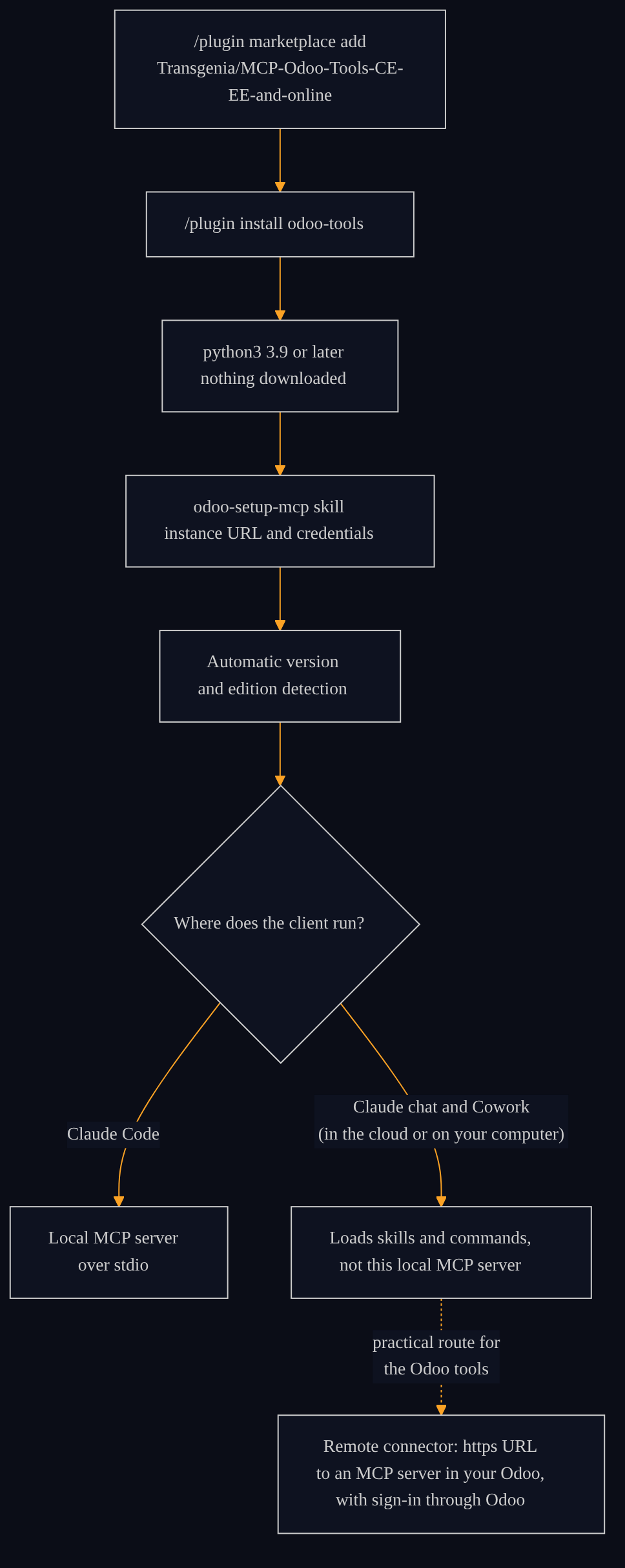
The plugin installs from the repository marketplace (/plugin marketplace add Transgenia/MCP-Odoo-Tools-CE-EE-and-online and /plugin install odoo-tools). The server starts with python3 (3.9+) from the bundled source, downloading and installing nothing. The odoo-setup-mcp skill walks through the initial configuration: instance URL, credentials and automatic version detection. The Odoo tools run as a local stdio MCP server in Claude Code, which prompts for the configuration values (or set them with /plugin configure). They do not run in Cowork or the Claude chat: Cowork ignores this server because its required options have no default and Cowork doesn't prompt for values, whether the session runs in the cloud or on your computer; the Claude chat ignores a plugin's local MCP server. Both load the plugin's skills and commands, but not this local MCP server. For Cowork and the Claude chat, the practical route is a remote connector: an https URL to an MCP server in your Odoo, with sign-in through Odoo. Verified on October 21, 2026 against Anthropic's official matrix.
The plugin also includes:
- Skills:
odoo-setup-mcp,odoo-setup-cli,odoo-connect,odoo-crossversion. - Specialized agents:
odoo(general operations) andodoo-migrator(version migration tasks). - CLI fallback: TypeScript implementation over XML-RPC, for environments where the MCP server is not available.
Marketplace note: Version 1.4.0 is listed in Claude's plugin directory and also installs from Transgenia's repository; being in the directory does not mean Anthropic certifies or audits it.
View Mermaid diagram
%%{init: {'theme': 'dark', 'themeVariables': {'primaryColor': '#1a2035', 'primaryTextColor': '#FFFFFF', 'primaryBorderColor': '#FBA225', 'lineColor': '#FBA225', 'background': '#0B0D17', 'mainBkg': '#0E1220', 'fontFamily': 'Inter, Arial, sans-serif', 'fontSize': '14px', 'edgeLabelBackground': '#0E1220', 'clusterBkg': '#101828', 'clusterBorder': '#FBA225'}}}%%
flowchart TD
    A["/plugin marketplace add
Transgenia/MCP-Odoo-Tools-CE-EE-and-online"] --> B["/plugin install odoo-tools"]
    B --> C["python3 3.9 or later
nothing downloaded"]
    C --> D["odoo-setup-mcp skill
instance URL and credentials"]
    D --> E["Automatic version
and edition detection"]
    E --> F{"Where does the client run?"}
    F -->|"Claude Code"| G["Local MCP server
over stdio"]
    F -->|"Claude chat and Cowork
(in the cloud or on your computer)"| H["Loads skills and commands,
not this local MCP server"]
    H -.->|"practical route for
the Odoo tools"| R["Remote connector: https URL
to an MCP server in your Odoo,
with sign-in through Odoo"]
What is intentionally excluded from the public layer
The public version contains the generic core. What we deliberately left out:
- MX fiscal layer (CFDI/SAT): UUID validation against the Mexican SAT, CFDI vault reads,
l10n_mx_edi_cfdi_sat_statequeries. Available in supervised implementations. - VoBo middleware (Visto Bueno, approval gating): write governance that requires explicit human authorization before creating or modifying production records. Configurable enforcement option.
- S3 backup tools: instance backup and restore.
- Vision and invoice parsing tools: document and PDF reading with language vision.
These layers make sense only in the context of a supervised implementation. The public core is genuinely useful on its own: they are not "cut" features to sell upgrades, but capabilities that require an onboarding process with the team.
For more context on the base API Key layer before the plugin, Connect Odoo to Claude with an API Key and Build Views Without Python covers the baseline options and their real limitations.

View Mermaid diagram
%%{init: {'theme': 'dark', 'themeVariables': {'primaryColor': '#1a2035', 'primaryTextColor': '#FFFFFF', 'primaryBorderColor': '#FBA225', 'lineColor': '#FBA225', 'background': '#0B0D17', 'mainBkg': '#0E1220', 'fontFamily': 'Inter, Arial, sans-serif', 'fontSize': '14px', 'edgeLabelBackground': '#0E1220', 'clusterBkg': '#101828', 'clusterBorder': '#FBA225'}}}%%
flowchart LR
    subgraph P["Public core, MIT license"]
        P1["28 tools"]
        P2["Compatibility layer 10 to 19"]
        P3["Three transports"]
        P4["Skills, agents and CLI fallback"]
    end
    subgraph S["Supervised implementation"]
        S1["MX fiscal layer, CFDI and SAT"]
        S2["VoBo middleware"]
        S3["S3 backup"]
        S4["Vision and invoice parsing"]
    end
    P -->|"requires onboarding with the team"| S
Why open source and why MIT
There is a pragmatic argument: a closed MCP server creates vendor dependency. If the pricing changes, the business model shifts, or the company disappears, the AI agent stops working. With open source (MIT), the company owns the code, can self-host it, and can hire any provider to maintain it. The plugin keeps working even if Transgenia does not exist tomorrow.
There is also an ecosystem argument: the more companies contribute to an Odoo MCP server, the more robust it becomes for everyone. The compatibility layer covers Odoo 10-19 today; the community can extend it to future versions without waiting for any specific vendor to do it.
We chose MIT over AGPL so companies can integrate the plugin into their proprietary stacks without copyleft restrictions. Copyleft has its place; here we prioritized adoption.

View Mermaid diagram
%%{init: {'theme': 'dark', 'themeVariables': {'primaryColor': '#1a2035', 'primaryTextColor': '#FFFFFF', 'primaryBorderColor': '#FBA225', 'lineColor': '#FBA225', 'background': '#0B0D17', 'mainBkg': '#0E1220', 'fontFamily': 'Inter, Arial, sans-serif', 'fontSize': '14px', 'edgeLabelBackground': '#0E1220', 'clusterBkg': '#101828', 'clusterBorder': '#FBA225'}}}%%
flowchart TD
    C["Closed MCP server"] --> C1["Pricing changes"] --> X["The agent stops working"]
    C --> C2["Business model shifts"] --> X
    C --> C3["Vendor disappears"] --> X
    M["MCP-Odoo-Tools, MIT license"] --> M1["The company owns the code"]
    M --> M2["Can self-host it"]
    M --> M3["Any provider can maintain it"]
    M --> M4["Fits proprietary stacks
without copyleft"]
    M1 & M2 & M3 & M4 --> Y["Keeps working
even if Transgenia is gone tomorrow"]
Verified technical quality
The plugin ships with complete CI:
- 27 unit tests passing: coverage of the version compatibility table, transport fallback regression tests and cache tests.
- Linting: ruff clean on Python 3.11 and 3.12.
- TypeScript CLI: builds without errors.
- Real MCP handshake (stdio): correctly lists all 28 tools of version 1.4.0.
- Live version matrix: Odoo Community 10.0 to 19.0 sandboxes in CI (run of 5 Oct 2026, ten versions green) with a version and read check over MCP.

View Mermaid diagram
%%{init: {'theme': 'dark', 'themeVariables': {'primaryColor': '#1a2035', 'primaryTextColor': '#FFFFFF', 'primaryBorderColor': '#FBA225', 'lineColor': '#FBA225', 'background': '#0B0D17', 'mainBkg': '#0E1220', 'fontFamily': 'Inter, Arial, sans-serif', 'fontSize': '14px', 'edgeLabelBackground': '#0E1220', 'clusterBkg': '#101828', 'clusterBorder': '#FBA225'}}}%%
flowchart LR
    A["27 unit tests
compatibility, transport, cache"] --> B["ruff
Python 3.11 and 3.12"]
    B --> C["TypeScript CLI
builds without errors"]
    C --> D["Real MCP handshake over stdio
lists all 28 tools"]
    D --> E["Odoo Community matrix 10.0 to 19.0
ten versions green, 5 Oct 2026"]
    E --> F(["Version 1.4.0 released"])
How to get started
If you have Odoo and want to explore AI agent integration, the recommended path has three steps:
- Instance diagnostic: version, edition, installed modules and flows that are candidates for AI automation.
- Read-only pilot: turn on the plugin's Read-only mode (
odoo_readonlyoption), which makes the server refuse every write, and validate that responses are correct before touching production data. - Governance before writes: human review of every write (VoBo) is not part of the public core; it is a layer of the accompanied implementation, configured with Transgenia's team before enabling writes in production.
If you want to see the stack in real operation before deciding, our sector-specific demo shows agents working on clinic and wholesale distributor data using the same MCP protocol.

View Mermaid diagram
%%{init: {'theme': 'dark', 'themeVariables': {'primaryColor': '#1a2035', 'primaryTextColor': '#FFFFFF', 'primaryBorderColor': '#FBA225', 'lineColor': '#FBA225', 'background': '#0B0D17', 'mainBkg': '#0E1220', 'fontFamily': 'Inter, Arial, sans-serif', 'fontSize': '14px', 'edgeLabelBackground': '#0E1220', 'clusterBkg': '#101828', 'clusterBorder': '#FBA225'}}}%%
flowchart LR
    A["1. Diagnostic
version, edition, modules and flows"] --> B["2. Read-only pilot
odoo_readonly on"]
    B --> C["3. VoBo governance
human review of every write"]
    C --> D["Writes in production"]
    B -.->|"if answers are not correct"| A
Frequently asked questions
Is MCP-Odoo-Tools free?
Yes. The public layer is MIT-licensed and has no cost. You can install and configure it yourself from the GitHub repository. The MX fiscal layer (CFDI/SAT), write governance middleware (VoBo) and other advanced components are available in Transgenia's supervised implementation packages.
Which Odoo versions are supported?
Odoo Community, Enterprise and online (SaaS) from version 10 through 19. The compatibility layer automatically resolves differences in model and field names across versions, including renames like account.invoice → account.move in v13 and other changes in later versions.
Does it work only with Claude or with other AI agents?
With any agent that implements the Model Context Protocol (MCP), the open specification published by Anthropic. Claude Code is the reference environment for which the plugin is packaged, but the server exposes a standard interface compatible with other MCP clients.
Does the plugin send my company's data to Transgenia's servers?
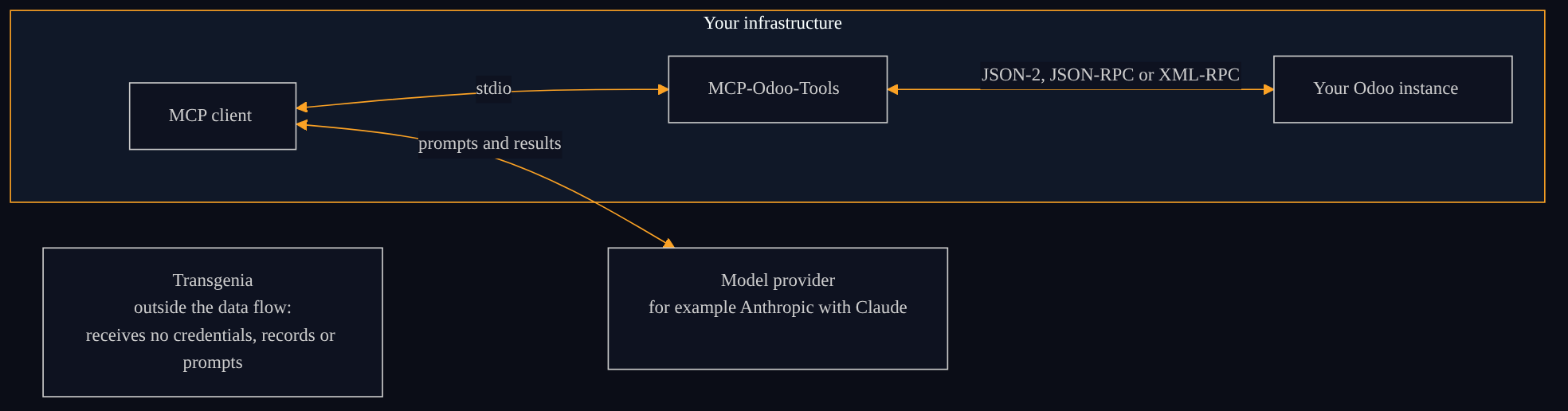
No. The MCP server runs on your machine (or on the infrastructure you choose) and communicates directly with your Odoo instance. Transgenia receives, proxies and retains no data from the plugin: not your credentials, not your records, not your prompts. The results Odoo returns do travel to your MCP client and from there to the model provider you use (for example Anthropic for Claude), as with any tool; that leg is governed by your Odoo's and your AI provider's terms, not by Transgenia.
Is it approved by Anthropic as an official plugin?
Not yet. The plugin is open source and distributed from Transgenia's own repository. Version 1.4.0 is listed in Claude's plugin directory and also installs from Transgenia's repository; being in the directory does not mean Anthropic certifies or audits it. Transgenia is a registered partner in Anthropic's Claude Partner Network, which means Anthropic recognizes us as a partner, not that the plugin is certified or audited by them. The distinction matters: the code is open and auditable by anyone.
View Mermaid diagram
%%{init: {'theme': 'dark', 'themeVariables': {'primaryColor': '#1a2035', 'primaryTextColor': '#FFFFFF', 'primaryBorderColor': '#FBA225', 'lineColor': '#FBA225', 'background': '#0B0D17', 'mainBkg': '#0E1220', 'fontFamily': 'Inter, Arial, sans-serif', 'fontSize': '14px', 'edgeLabelBackground': '#0E1220', 'clusterBkg': '#101828', 'clusterBorder': '#FBA225'}}}%%
flowchart LR
    subgraph T["Your infrastructure"]
        M["MCP client"] <-->|stdio| S["MCP-Odoo-Tools"]
        S <-->|"JSON-2, JSON-RPC or XML-RPC"| O["Your Odoo instance"]
    end
    M <-->|"prompts and results"| P["Model provider
for example Anthropic with Claude"]
    X["Transgenia
outside the data flow:
receives no credentials, records or prompts"]
About the author and Transgenia
Efraín Carreón Ortiz is CEO of Centrum Transgenia, a Mexican technology boutique. He holds the official Claude Code badge (Claude Partner Badge) issued by Anthropic, verifiable on Credly.
Transgenia is an OpenAI Select Partner within the OpenAI Partner Network and a registered partner in Anthropic's Claude Partner Network. We operate twelve governed AI agents in our own production environment and accompany verifiable implementations in the healthcare and B2B sectors.
Let's talk: LinkedIn, 15-minute agenda or our contact page.
Keep reading
- Connect Odoo to Claude with an API Key and Build Views Without Python: the base layer before the plugin, to understand the baseline options and their real limitations.
- How Transgenia Runs with Governed AI Agents: the governance model (draft-first, human VoBo, MCP) surrounding this plugin in production.
- Implementing Claude in Your Business: a Phase-by-Phase Guide: the full adoption method from a registered Anthropic partner.
- MCP-Odoo-Tools user manual: the full plugin reference: installation, the tool catalog and cross-version compatibility.
- Our governed AI solutions.
- Who integrates Claude or ChatGPT with Odoo in Mexico? Hiring guide: criteria to choose and hire an integrator, with six evidence questions and ten written conditions.
- meet.transgenia.org: how we stopped paying for Read AI: our own meeting platform with transcription, human-approved minutes and commercial signals that reach Odoo.