If someone offers you "AI that quotes on its own", the right question is not which model it uses, but in which state it leaves the quotation, what it can read, what it cannot write and who approves. This guide answers that with Odoo's states and documentation, and with the method we apply at Transgenia.
View Mermaid diagram
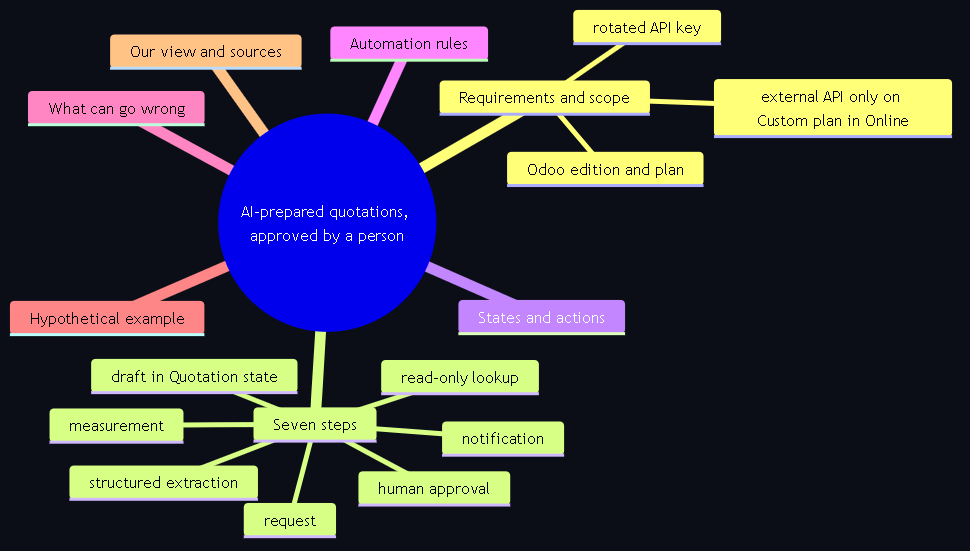
mindmap
  root(("AI-prepared quotations, approved by a person"))
    Requirements and scope
      Odoo edition and plan
      external API only on Custom plan in Online
      rotated API key
    Seven steps
      request
      structured extraction
      read-only lookup
      draft in Quotation state
      notification
      human approval
      measurement
    States and actions
    Automation rules
    What can go wrong
    Hypothetical example
    Our view and sources
Requirements and scope
| Point | What you need | What this guide does not cover |
|---|---|---|
| Odoo edition | Community or Enterprise. The quotation model (sale.order) and its states exist in both. Studio (automation rules) is paid: on Odoo Online, installing it switches the database to the Custom plan. | Third-party approval modules from the Odoo app store: they exist, but we do not evaluate them here. |
| Deployment and plan | Self-hosted or Odoo.sh: the external API is available. Odoo Online: "Access to data via the external API is only available on Custom Odoo pricing plans"; it is not available on One App Free or Standard. | Plan and AI prices: they go in a separate guide on cost factors. |
| Version | Odoo 19 uses the JSON-2 API with an API key as a bearer token. Earlier versions use JSON-RPC or XML-RPC; both are scheduled for removal in Odoo 22. | Odoo earlier than 13 (outside the scope of Transgenia's service). |
| Credentials | An API key created by a user with minimal permissions (Preferences, Account Security, New API Key) and rotated at least every three months. | We never ask for keys in forms or chat. |
| AI layer | Claude or ChatGPT via API, or an MCP server (for example, Transgenia's open server in read-only mode) so the agent queries Odoo with scoped tools. | Agents that write directly to the ERP without a draft state: we do not recommend them. |
| People | A salesperson who approves, a pricing owner and someone who defines the acceptance criteria. | Replacing the salesperson. AI prepares; the person decides. |
Step by step: from the request to the approved quotation
1. Define what counts as a request and where it comes from
Email, WhatsApp, web form, PDF or Excel. To start, choose a single channel and a single product category. A scoped pilot lets you measure errors before scaling.
2. Extract structured data, not prose
The AI turns the customer's text into a record with customer, lines (product, quantity, unit), delivery date and terms. If a piece of data is missing or there are two compatible products, the agent asks; it does not fill in on its own. Model providers offer structured outputs for this; use them.
3. Query Odoo with read-only permissions
The agent looks up the customer in Contacts, maps each line to the catalog (reference, variant, unit), reads the assigned pricelist, taxes and availability. Odoo computes prices, discounts and taxes; the AI does not invent or recalculate amounts. With an MCP server in read-only mode, any write attempt is refused before it reaches Odoo.
4. Create the quotation in the Quotation state
A technical account different from the agent's, with permission to create quotations and nothing else, records the draft with a visible tag ("Generated by AI") and a note in the chatter indicating the source request and the date. The initial state is Quotation. Nothing is sent.
5. Notify the salesperson with the summary and the warnings
An activity in Odoo or a notice to the team channel with the link to the draft, the ambiguous products, the insufficient stock and the terms outside policy.
6. Human review and approval
The salesperson edits quantities, prices or terms and decides. Only then do they click Send by Email or Confirm. According to the Odoo 19 documentation, on confirmation "the quotation is confirmed, and the status changes to Sales Order" and "it officially turns into a sales order, which can then be invoiced and paid for".
7. Measure before scaling
Percentage of drafts approved without changes, errors by type (product, quantity, price), salesperson time per quotation and quotations that required clarification. With those numbers you decide whether to extend the channel or the category.
View Mermaid diagram
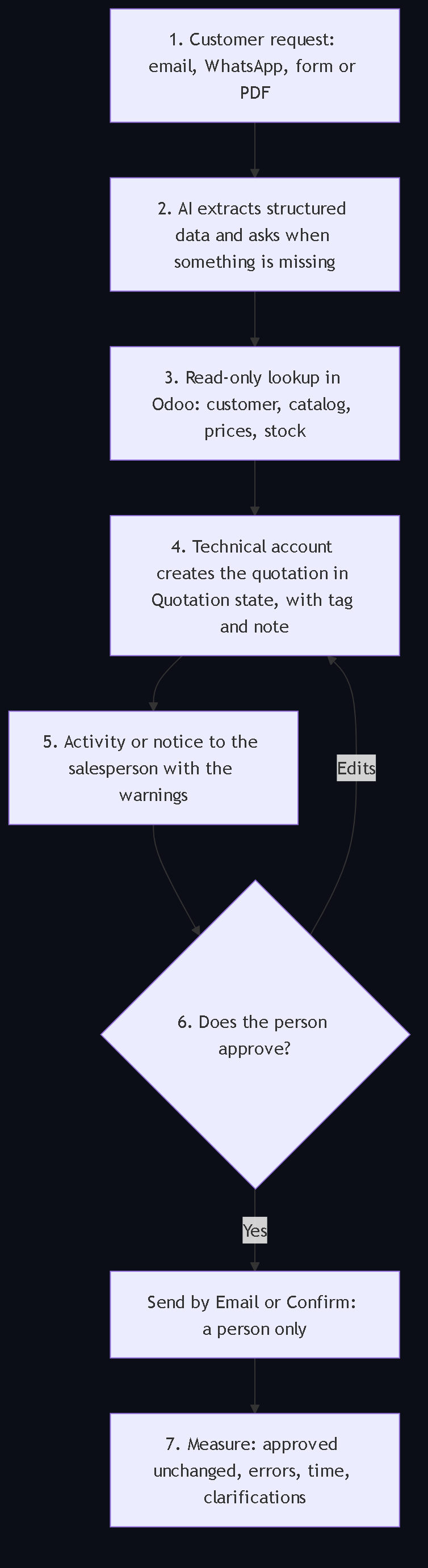
flowchart TB
    S1["1. Customer request: email, WhatsApp, form or PDF"] --> S2["2. AI extracts structured data and asks when something is missing"]
    S2 --> S3["3. Read-only lookup in Odoo: customer, catalog, prices, stock"]
    S3 --> S4["4. Technical account creates the quotation in Quotation state, with tag and note"]
    S4 --> S5["5. Activity or notice to the salesperson with the warnings"]
    S5 --> S6{"6. Does the person approve?"}
    S6 -- "Edits" --> S4
    S6 -- "Yes" --> S7["Send by Email or Confirm: a person only"]
    S7 --> S8["7. Measure: approved unchanged, errors, time, clarifications"]
States and allowed actions
| State in Odoo | Who can move it there | What is allowed |
|---|---|---|
| Quotation (draft) | The integration, with a technical account with minimal permissions | Create and edit lines, tag "Generated by AI", leave a note in the chatter |
| Quotation Sent | Only a person, with Send by Email | Forbidden for the agent; the server validates that the AI cannot invoke the action |
| Sales Order | Only a person, with Confirm (or the customer from the portal, if configured) | Forbidden for the agent; it triggers deliveries and invoicing |
| Cancelled | A person | Record the reason |
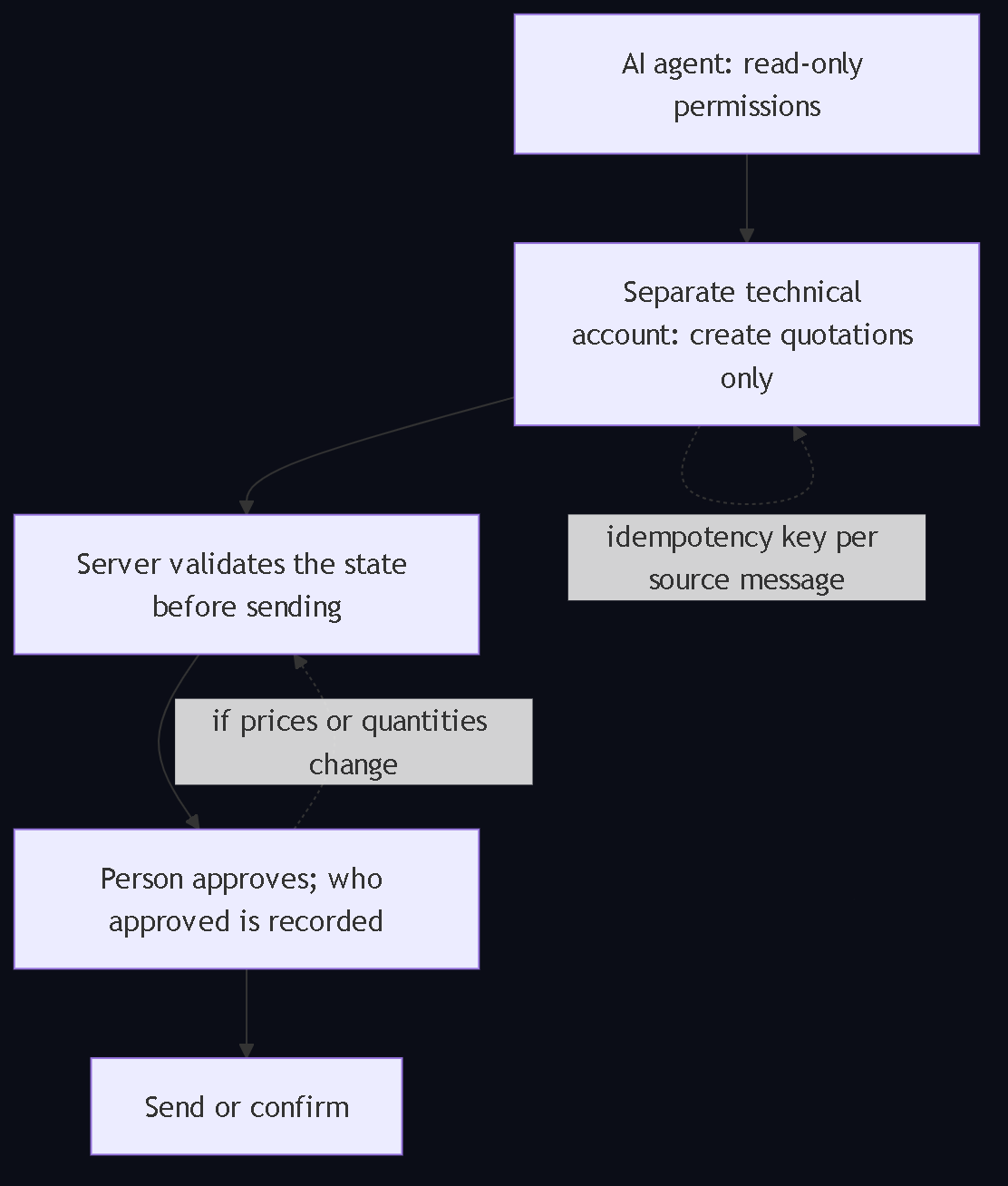
Two rules that are not optional. First: the server validates the state before executing the send; an approve button in the interface is not a control if the integration can bypass it. Second: if someone changes prices or quantities after approval, the quotation goes back to review and who approved each version is recorded.
View Mermaid diagram
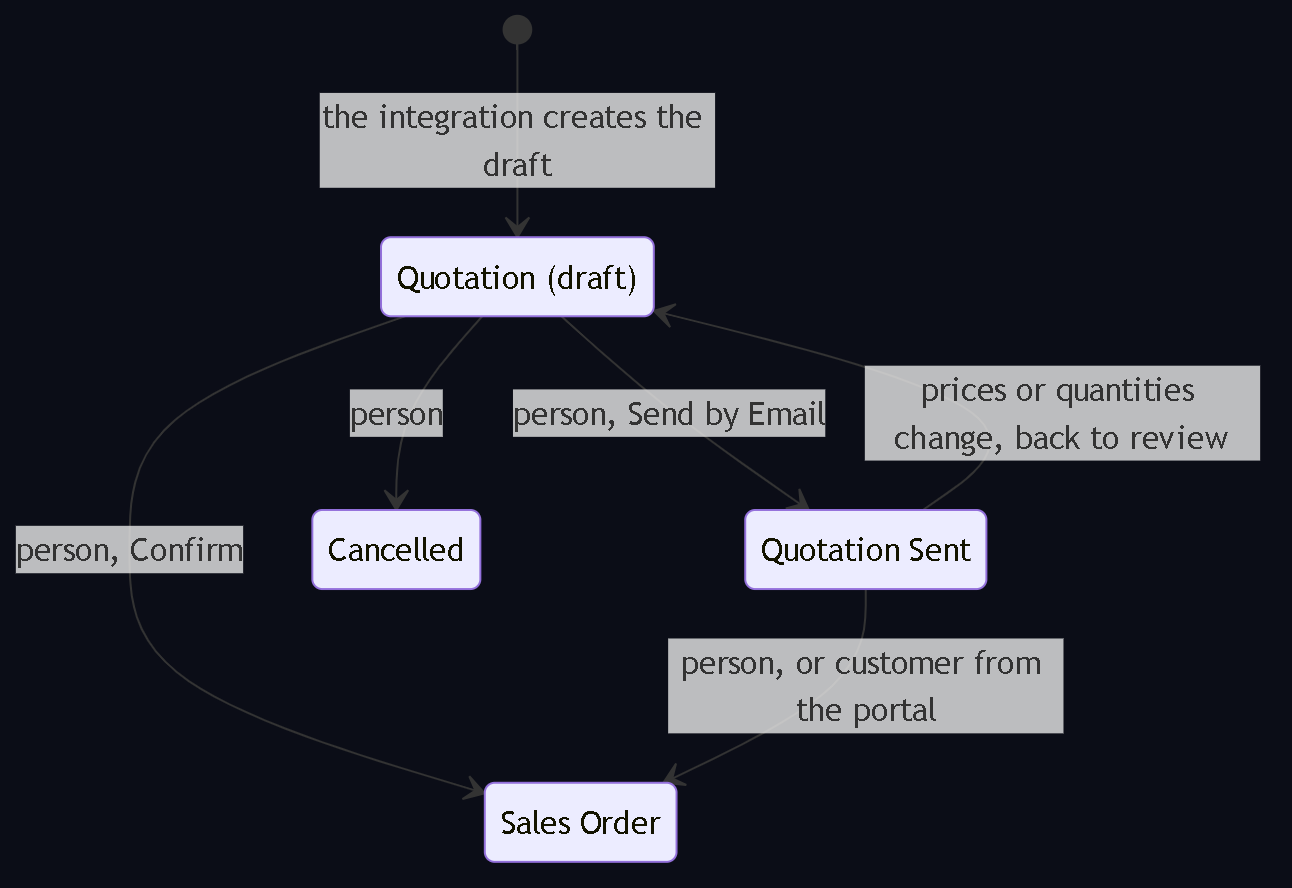
stateDiagram-v2
    [*] --> Quotation: the integration creates the draft
    state "Quotation (draft)" as Quotation
    state "Quotation Sent" as Sent
    state "Sales Order" as Order
    Quotation --> Sent: person, Send by Email
    Quotation --> Order: person, Confirm
    Sent --> Order: person, or customer from the portal
    Quotation --> Cancelled: person
    Sent --> Quotation: prices or quantities change, back to review
Where Odoo's automation rules fit
Studio's automation rules "allow the execution of one or more predefined actions in response to a specific trigger". There are five trigger categories (values updated, email events, timing conditions, custom and external) and actions such as update record, create activity, send email or SMS, send WhatsApp, execute code or send a webhook. They serve to notify the salesperson when a tagged draft arrives or to return a quotation whose total changed to review. They do not replace the server control: the documentation recommends activating developer mode for the filters and, on Odoo Online, installing Studio switches the database to the Custom plan.
View Mermaid diagram
flowchart TB
    A["AI agent: read-only permissions"] --> B["Separate technical account: create quotations only"]
    B --> C["Server validates the state before sending"]
    C --> D["Person approves; who approved is recorded"]
    D --> E["Send or confirm"]
    B -. "idempotency key per source message" .-> B
    D -. "if prices or quantities change" .-> C
What can go wrong
- Ambiguous products. "White paint" can be five references. Without fuzzy search and a confirmation question, the draft goes out with the wrong product and the salesperson stops trusting the tool.
- Invented prices. If the model computes or "estimates" a price, the control breaks even if the quotation is a draft. Prices and taxes are computed by Odoo.
- Duplicates from retries. The same email or message can trigger the integration twice. Use the source message identifier as an idempotency key.
- Agent with broad write permissions. An account with access to Confirm or to invoice turns an interpretation error into a sale or a CFDI. Minimal permissions and a separate technical account.
- Odoo Online plan without external API. With One App Free or Standard there is no external API; the project stops at the first call.
- Unrotated keys. The Odoo documentation asks to rotate long-lived keys at least every three months.
- CFDI by reflex. Confirming an order must not stamp anything on its own. Invoicing follows its own authorized flow.
Hypothetical example
This example illustrates a proposed flow; it does not report a client's results or figures. A distributor receives by email: "I need 20 boxes of medium nitrile gloves and 5 of large gloves, delivery on Thursday, invoice to the usual RFC". The AI extracts two lines, the date and the invoicing instruction; it finds two presentations of the medium glove and asks which one; with the answer, it looks up stock and the customer's pricelist and creates the quotation in the Quotation state with the "Generated by AI" tag and the note "source: email of October 13". The salesperson receives an activity, sees that there are 18 boxes of the medium one available, adjusts to 18 and 7, and sends. The invoicing instruction is not executed: accounting issues the invoice when it is due. If a price were missing or the agent had no permission to read the pricelist, the flow would stop asking for validation. Checking stock is not reserving it.
What we think at Transgenia
- AI proposes; the person decides. We do not sell agents that confirm, send or invoice on their own. During the first months, every write goes through a person who approves.
- Read-only first. We start with the MCP server in read-only mode (it refuses every write before it reaches Odoo) and expand permissions with evidence, not with promises.
- The control lives on the server, not in the button. If an integration can bypass the approval, there is no approval.
- Reliable data first. If the catalog has duplicates or prices do not balance, AI only accelerates the errors. That is why the inventory-before-migrating guide comes before this one.
- Honest scope. The open server covers Odoo 10 to 19; Transgenia's service is offered for Odoo 13 to 19, which is what we can sustain with real support.
About the tool we use: MCP-Odoo-Tools is an open-source MCP server (MIT) with 28 tools, Odoo 10 to 19 coverage in Community, Enterprise and Online, a read-only mode and a privacy notice (Transgenia does not proxy or store the data; results go to the MCP client and the model provider). It is on PyPI as odoo-mcp-tools 1.4.0 and as the "Odoo Tools" plugin in the Claude directory, where, according to the directory administration panel with data through October 11, 2026, it has 506 cumulative installs, 203 active accounts in 28 days and 0 errors in 15,651 loads.
Sources
Every technical fact in this guide rests on a public source checked on October 12, 2026. The plugin figures are Transgenia's and are labeled as such.
- Odoo 19, Create quotations: the quotation is created in Sales and, on confirmation, "the status changes to Sales Order" and "it officially turns into a sales order, which can then be invoiced and paid for".
- Odoo 19, External JSON-2 API: "Access to data via the external API is only available on Custom Odoo pricing plans"; API key as a bearer token; creation under Preferences, Account Security, New API Key; rotation at least every three months; XML-RPC and JSON-RPC scheduled for removal in Odoo 22.
- Odoo 19, Automation rules (Studio): definition, five trigger categories and list of actions; developer mode recommended.
- Odoo, plans and pricing: "If you install Studio or add companies to your database, you will automatically switch to the Custom plan"; External API and Studio in the Custom column.
- MCP-Odoo-Tools repository (MIT): Odoo 10 to 19 coverage, Community and Enterprise, self-hosted and Online; 28 tools; "With Read-only mode (ODOO_READONLY=1) every write tool is refused before anything reaches Odoo"; privacy notice.
- odoo-mcp-tools package on PyPI: version 1.4.0, MIT license, Python 3.9 or later (verified with the PyPI API).
- Anthropic, Model Context Protocol announcement: MCP is an open standard; Transgenia's server implements it, the protocol is not Transgenia's.
- Claude directory administration panel, data through October 11, 2026, Transgenia's internal source: installs, active accounts and error-free loads of the Odoo Tools plugin.
Frequently asked questions
Can the AI send the quotation to the customer if a person already reviewed a similar one?
Not in our method. Each quotation is a separate commercial decision: prices, availability and terms change. The agent leaves it in the Quotation state and a person executes the send. The server validates that state before allowing the send, so the integration cannot bypass it.
In which Odoo state should an AI-prepared quotation stay?
In Quotation, the initial state of the sale.order model, with a visible tag and a note in the chatter indicating its origin. The Quotation Sent and Sales Order states are reserved to a person: the first with Send by Email, the second with Confirm, which according to the Odoo 19 documentation turns the quotation into an invoiceable sales order.
What permissions does the AI agent need in Odoo?
Read access to contacts, products, pricelists and stock, and nothing else. The draft is created by a separate technical account with permission to create quotations, without access to confirm, deliver or invoice. With an MCP server in read-only mode, every write is refused before it reaches Odoo.
Does it work on Odoo Online?
Only if the plan includes the external API: according to the Odoo 19 documentation, data access through the external API is available only on the Custom plan, not on One App Free or Standard. On self-hosted and Odoo.sh that restriction does not exist.
Does it work the same with Claude as with ChatGPT?
Yes. The model extracts structured data and asks when there is ambiguity; the control of the flow (draft state, permissions, server validation) does not depend on the model. Claude Code runs local MCP servers, which is why the Odoo plugin runs there; ChatGPT connects through the OpenAI API or each provider's connectors.
What happens if the customer asks for a product that does not exist in the catalog?
The agent must not invent it or silently pick "the closest one". It creates the draft with the pending line and an internal note indicating the item not found, or asks before creating anything. The salesperson resolves it.
Are Studio's automation rules enough to enforce the approval?
They serve to notify (create an activity, send an email or a WhatsApp message) and to return a quotation whose total changed to review. They do not replace the server validation of the state before sending. Studio is paid: on Odoo Online, installing it switches the database to the Custom plan.
How do I avoid duplicate quotations when the integration retries?
Use the identifier of the source message or email as an idempotency key: if a draft with that origin already exists, another one is not created. It is one of the controls we test before opening the channel.
Does the approved quotation generate the invoice automatically?
No. Confirming an order must not stamp anything on its own; invoicing follows accounting's authorized flow, with its own review. Separating the commercial confirmation from the CFDI avoids invoices issued because of a misread message.
Which Odoo version do I need?
Odoo 19 offers the JSON-2 API with an API key; earlier versions use JSON-RPC or XML-RPC, which are scheduled for removal in Odoo 22. Transgenia's open MCP server covers Odoo 10 to 19; the implementation service is offered for 13 to 19.
What should I prepare before requesting an assessment of this flow?
The channel through which requests arrive, real examples of requests, the Odoo version, edition and plan, the current pricelists, who approves quotations today and which acceptance criterion you would use for the pilot. Access is agreed during the assessment; do not share credentials.
How do you measure whether the flow works?
With four numbers per week: drafts approved without changes, errors by type (product, quantity, price), salesperson time per quotation and requests that required clarification. Without measurement with evidence we do not publish figures or extend the scope.
Next step
If your company already runs Odoo and receives quotation requests by email or WhatsApp, first review the AI implementation and Odoo integration offer and, if you are a trading company or distributor, the Odoo for trading companies page, where the three guides are gathered. Then request an assessment: we define the process, the permissions and the acceptance criteria before quoting.
About the author and Transgenia
Efraín Carreón Ortiz is CEO of Centrum Transgenia, a Mexican technology boutique. He holds the official Claude Code badge (Claude Partner Badge) issued by Anthropic, verifiable on Credly.
Transgenia is an OpenAI Select Partner within the OpenAI Partner Network and a registered partner in Anthropic's Claude Partner Network. Team: Víctor Estrada Bello, Chief PMO; Danild Johan Zambrana López, Chief Technology Officer; Jaime Lozano Castañeda, Chief Marketing Officer; Efraín Carreón Ortiz, Director General (Chief Executive Officer).
Let's talk: contacto@transgenia.org, WhatsApp +52 55 8034 0405, 15-minute call or the contact page.
Keep reading
- How to connect WhatsApp orders to Odoo with AI: the same draft-and-human-confirmation principle, applied to the WhatsApp channel.
- How to correct inventory differences in Odoo before migrating: reliable data comes before any agent.
- Who integrates Claude or ChatGPT with Odoo in Mexico?: what to demand in writing from an integrator, including this flow.
- How Transgenia runs with governed AI agents: the draft-first and sign-off model applied to our own operation.
- What to isolate before testing an agent on a copy of Odoo: the safe test before any write.
- We published MCP-Odoo-Tools and the MCP server page: the query layer to Odoo.
- Odoo for B2B trading companies: the vertical hub.