In a Mexican trading company, many orders arrive on WhatsApp as loose text, photos or voice notes, and someone retypes them into the ERP. This guide explains how to connect that channel to Odoo and an AI layer without the agent confirming orders, inventing prices or invoicing on its own.
View Mermaid diagram
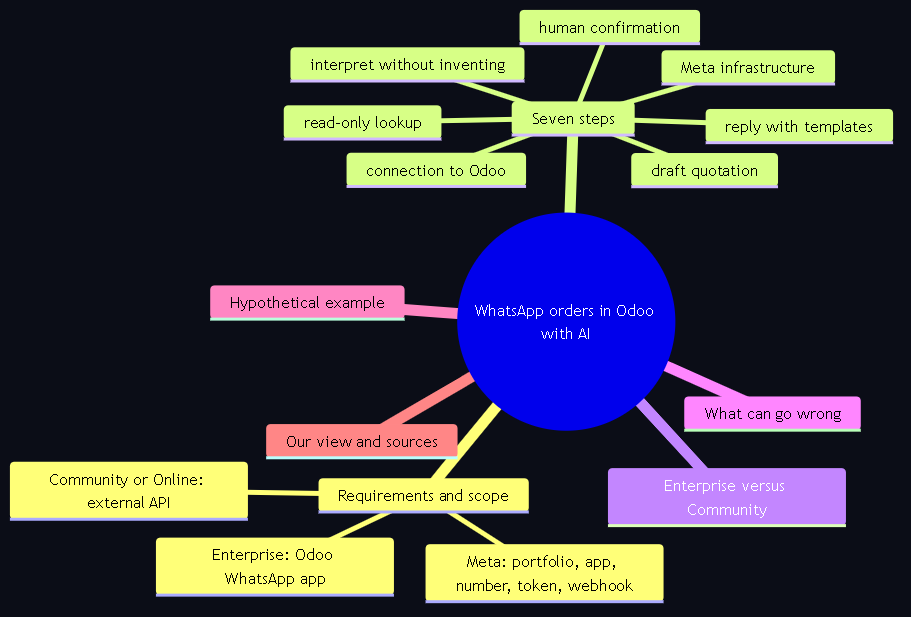
mindmap
  root(("WhatsApp orders in Odoo with AI"))
    Requirements and scope
      Meta: portfolio, app, number, token, webhook
      Enterprise: Odoo WhatsApp app
      Community or Online: external API
    Seven steps
      Meta infrastructure
      connection to Odoo
      interpret without inventing
      read-only lookup
      draft quotation
      reply with templates
      human confirmation
    Enterprise versus Community
    What can go wrong
    Hypothetical example
    Our view and sources
Requirements and scope
| Point | What you need | What this guide does not cover |
|---|---|---|
| On the Meta side | A business portfolio ("You must have a business portfolio to use the platform"), a developer account, an app with the WhatsApp use case connected to a WhatsApp Business account, a dedicated number, a permanent token and a webhook. Business verification improves capabilities (for example, higher volume). | Meta's fees: they change by country and conversation type; check Meta's pricing page with a date. We do not publish amounts. |
| Enterprise path | Odoo 17, 18 or 19 Enterprise with the WhatsApp app: WhatsApp, Configuration, WhatsApp Business Accounts, New, with the App ID, the WhatsApp Business account ID and the access token; the callback URL and the verification token are generated by Odoo when you test the connection. | Advanced template setups and campaigns: out of scope. |
| Community or Online path | An intermediate service (orchestrator or agent) that receives Meta's webhook and talks to Odoo through the external API. On Odoo Online the external API is only on the Custom plan. On Odoo 19, JSON-2 API with an API key as a bearer token. | Connectors that read WhatsApp Web without the official API: risk of the number being blocked; we do not recommend them. |
| AI layer | Claude or ChatGPT via API (or an open-source MCP server to query Odoo in read-only mode). The model extracts customer, products, quantities and date; it asks when something is missing; it does not compute prices. What to demand in writing from whoever integrates it is in the guide to hiring a Claude or ChatGPT integration with Odoo. | Voice note transcription: it depends on the AI provider you choose; this guide does not evaluate transcription products. |
| People | A salesperson who confirms, a catalog owner (synonyms and packaging) and someone who approves message templates. | Mass sends or cold prospecting on WhatsApp: not the goal of this guide or of our practice. |
View Mermaid diagram
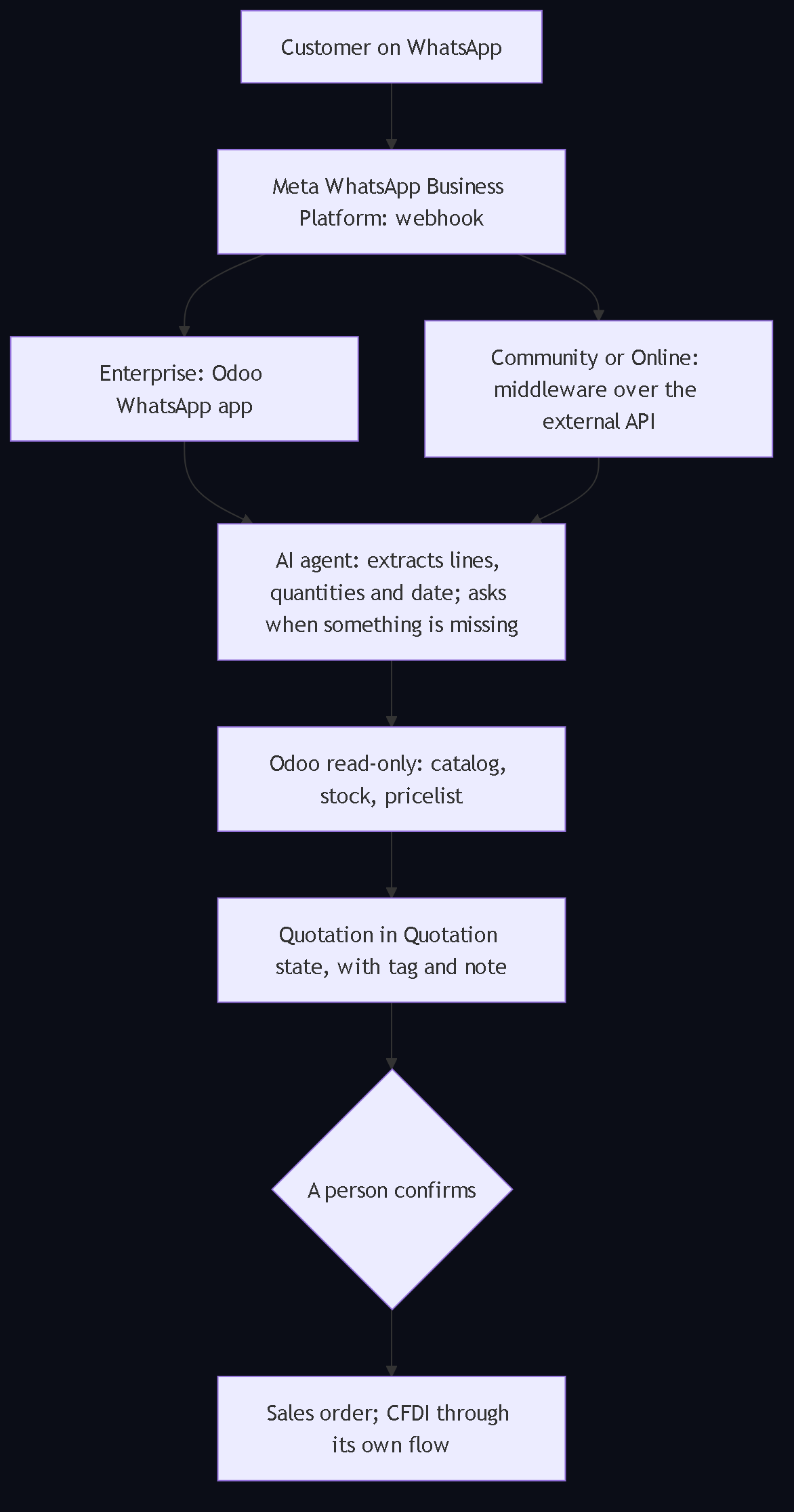
flowchart TB
    C["Customer on WhatsApp"] --> M["Meta WhatsApp Business Platform: webhook"]
    M --> E["Enterprise: Odoo WhatsApp app"]
    M --> S["Community or Online: middleware over the external API"]
    E --> IA["AI agent: extracts lines, quantities and date; asks when something is missing"]
    S --> IA
    IA --> O["Odoo read-only: catalog, stock, pricelist"]
    O --> Q["Quotation in Quotation state, with tag and note"]
    Q --> P{"A person confirms"}
    P --> V["Sales order; CFDI through its own flow"]
Step by step: from the message to the draft quotation
1. Prepare Meta's infrastructure
Create or choose the business portfolio and a Meta developer account. In the app dashboard, create a new Meta app with the WhatsApp use case and connect the app to a WhatsApp Business account. Use a number dedicated to the platform. Create a permanent token for use across the WhatsApp Business Platform and set up the webhook to receive incoming messages and delivery statuses. Verify the business if you want higher capacity.
2. Connect WhatsApp to Odoo according to your edition
Enterprise. In Odoo, go to WhatsApp, Configuration, WhatsApp Business Accounts and click New. Enter the App ID, the WhatsApp Business account ID and the access token. When you test the connection, Odoo generates the callback URL and the verification token you will paste into Meta's webhook. Templates go through approval: WhatsApp has an approval process you must complete before you can use the template.
Community or Online with the Custom plan. Meta's webhook points to your intermediate service, which validates the sender, stores the message and calls Odoo through the external API (JSON-2 with an API key on Odoo 19). Conversations do not live inside Odoo, but every order does: it is recorded as a quotation with its origin in the chatter.
3. Interpret the message with AI, without inventing anything
The agent turns "send me 3 boxes of the 16 and 5 of the 20 for Thursday" into lines with product, quantity and unit, plus the date. To do it well it needs a catalog dictionary with the names your customers use (carton, box, piece, short codes). If there is ambiguity or a missing piece of data, it answers with a question in the same conversation; it does not guess. The rules that keep a governed AI agent for B2B sales from inventing or spamming are the same ones we apply here.
4. Query Odoo with read-only permissions
Look up the contact by phone or name, map each line to the catalog (reference, variant, unit), read the customer's pricelist and the availability per warehouse. Odoo computes prices, discounts and taxes. With an MCP server in read-only mode, any write attempt is refused before it reaches Odoo; how to connect Odoo to Claude with an API key and scoped permissions and what to isolate in a copy of Odoo before testing the agent each have their own guide.
5. Create the quotation in the Quotation state
A technical account different from the agent's creates the quotation with the "Generated by AI" tag and a note in the chatter with the source message and the time. State: Quotation. Nothing is confirmed or sent. The Odoo states, the server-side controls and the typical failures of that step are in the guide to AI-prepared quotations with human approval.
6. Reply to the customer with what can be stated
A summary of lines, quantities and the total computed by Odoo, with the note that the delivery date is confirmed after validation. If the conversation is outside the customer service window, only an approved template can go out: templates are the only type of message that can be sent to WhatsApp users outside of a customer service window.
7. Human confirmation and what follows
The salesperson opens the draft, reviews stock and terms, adjusts and clicks Confirm. According to the Odoo 19 documentation, on confirmation "the quotation is confirmed, and the status changes to Sales Order" and "it officially turns into a sales order, which can then be invoiced and paid for". Picking, delivery and the invoice follow the company's usual flow; the CFDI is not stamped because of a message.
View Mermaid diagram
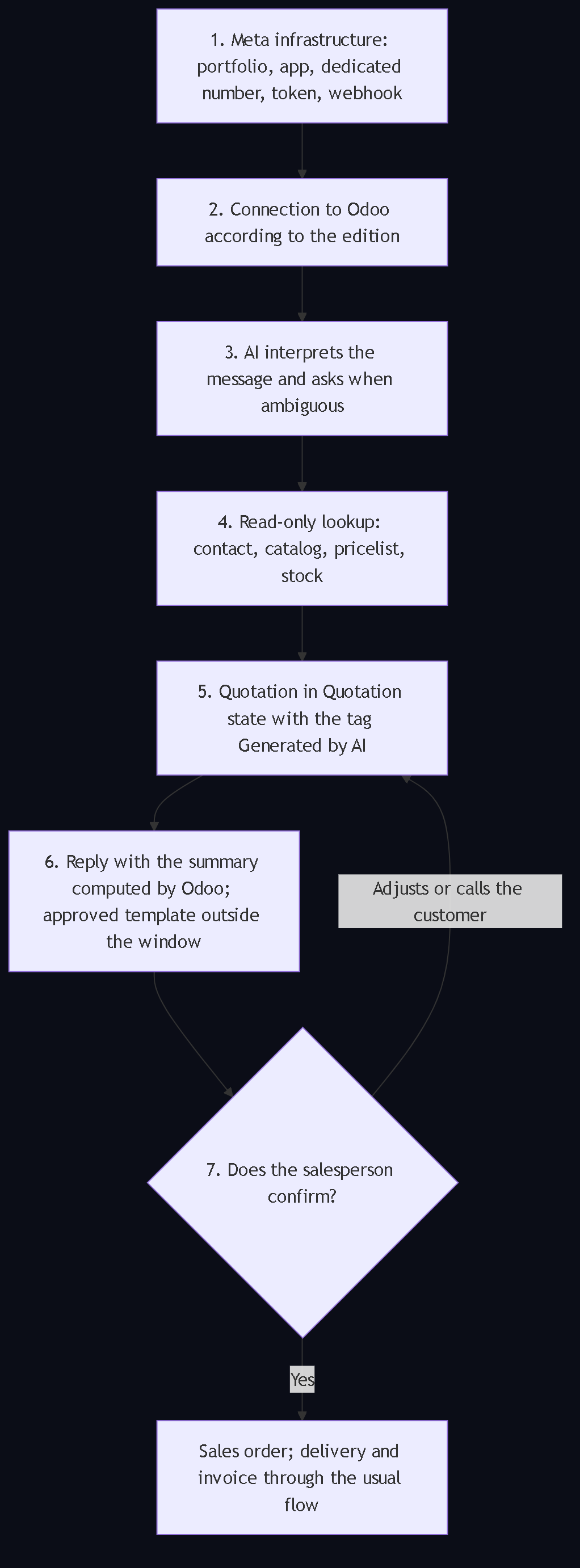
flowchart TB
    S1["1. Meta infrastructure: portfolio, app, dedicated number, token, webhook"] --> S2["2. Connection to Odoo according to the edition"]
    S2 --> S3["3. AI interprets the message and asks when ambiguous"]
    S3 --> S4["4. Read-only lookup: contact, catalog, pricelist, stock"]
    S4 --> S5["5. Quotation in Quotation state with the tag Generated by AI"]
    S5 --> S6["6. Reply with the summary computed by Odoo; approved template outside the window"]
    S6 --> S7{"7. Does the salesperson confirm?"}
    S7 -- "Adjusts or calls the customer" --> S5
    S7 -- "Yes" --> V["Sales order; delivery and invoice through the usual flow"]
Enterprise versus Community: what changes
| Aspect | Odoo Enterprise with the WhatsApp app | Odoo Community or Online with the external API |
|---|---|---|
| Where conversations live | Inside Odoo (WhatsApp app) | In the intermediate service; in Odoo, the order and its origin note remain |
| Templates | Managed in Odoo and approved by Meta | Managed in Meta or in the middleware; same approval |
| Plan requirement | Enterprise subscription | Community: none. Online: Custom plan for the external API |
| AI layer | External to Odoo in both cases (Odoo does not interpret the order by itself); it can notify with Studio's Send WhatsApp action | External; the middleware orchestrates AI and API |
| Order control | Draft quotation and human confirmation | The same |
View Mermaid diagram
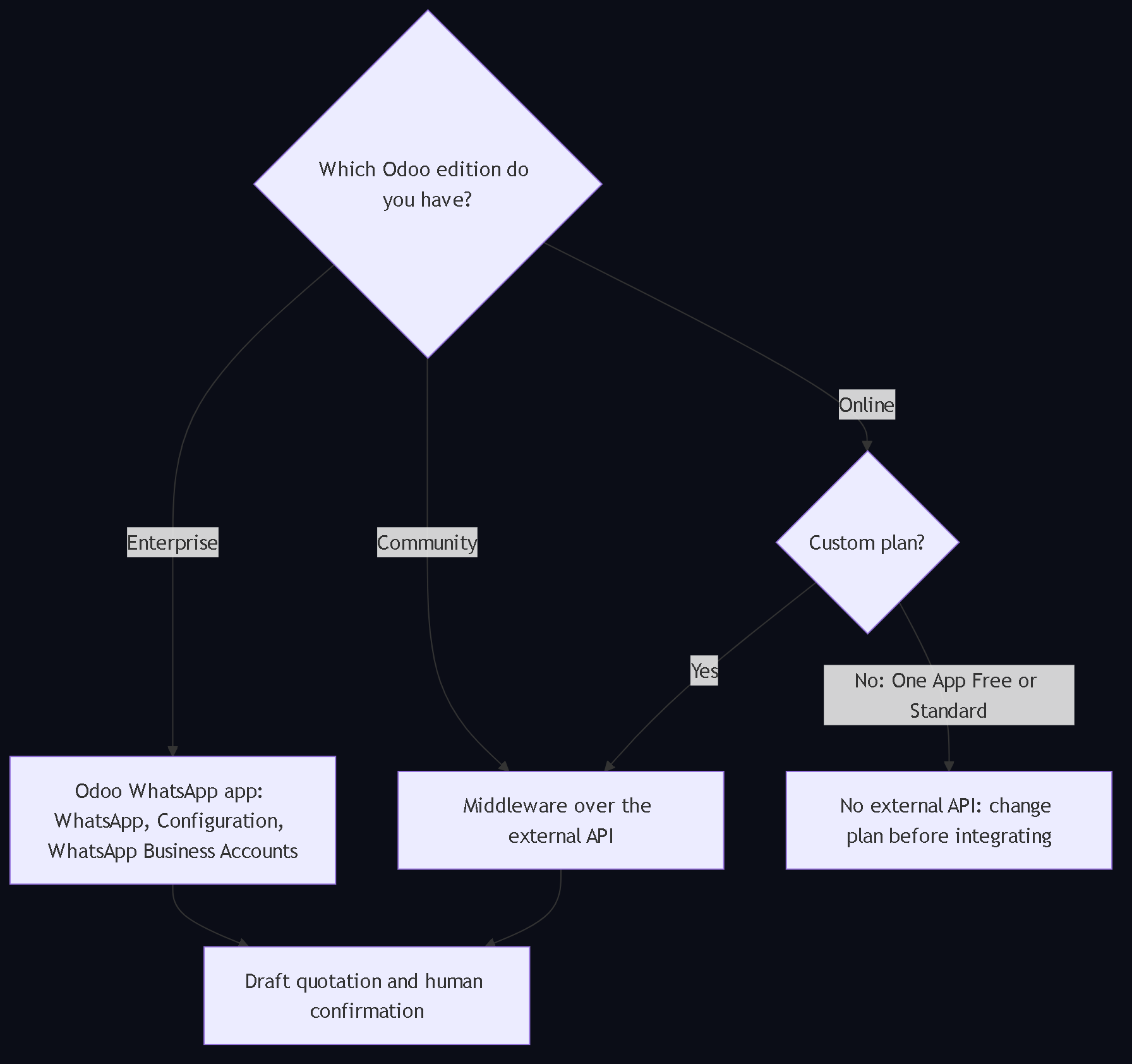
flowchart TB
    A{"Which Odoo edition do you have?"}
    A -- "Enterprise" --> E["Odoo WhatsApp app: WhatsApp, Configuration, WhatsApp Business Accounts"]
    A -- "Community" --> C["Middleware over the external API"]
    A -- "Online" --> P{"Custom plan?"}
    P -- "Yes" --> C
    P -- "No: One App Free or Standard" --> X["No external API: change plan before integrating"]
    E --> R["Draft quotation and human confirmation"]
    C --> R
What can go wrong
- Number in Pending state at Meta. The Odoo documentation warns that the number may remain pending in the developer app and that this can prevent the WhatsApp integration from working correctly.
- Unapproved templates. Without Meta's approval the message does not go out; outside the service window, only templates go out.
- Using the WhatsApp app instead of the platform. The phone app is not the API; mixing both on the same number causes failures and risk of blocking.
- An agent that confirms. If the technical account can confirm or invoice, a misread order becomes a sale or a CFDI.
- Invented prices. The model must not compute or "estimate" prices; Odoo computes them with the customer's pricelist.
- Duplicates from retries. The same message can arrive twice through the webhook; use the message identifier as an idempotency key.
- Catalog without synonyms. "Box of the 16" does not exist in Odoo; a reference does. Without the dictionary, the agent asks too much or gets it wrong; the catalog is cleaned with the procedure to correct inventory differences in Odoo.
- Odoo Online plan without external API. With One App Free or Standard the Community or Online path does not work.
Hypothetical example
This example illustrates a proposed flow; it does not report a client's results or figures. A hardware wholesaler on Odoo Community receives on WhatsApp: "Hi, this is Construcciones del Valle, send me 12 boxes of 2-inch galvanized screws and 4 of number 8 anchors, for tomorrow". Meta's webhook delivers the message to the intermediate service; the agent identifies two lines and the date, finds two presentations of the screw (box of 100 and of 500) and asks which one; with the answer, it looks up stock and the customer's pricelist and creates the quotation in the Quotation state with the "Generated by AI" tag. It replies with the summary and the total computed by Odoo, without promising a date. The salesperson sees that only 10 boxes are available, adjusts, calls the customer and confirms. Accounting issues the CFDI when it is due. If the agent had no permission to read the pricelist, the flow would stop asking for validation.
What we think at Transgenia
- WhatsApp is an operational channel, not a cold prospecting channel. We integrate AI with WhatsApp for appointment confirmations, order handling and sales follow-up, with every message logged in Odoo. In our own operation, an agent reads and drafts; a person authorizes the send: that is how Transgenia runs with governed AI agents.
- AI proposes; the person confirms. The correct outcome of this integration is a draft quotation, not a confirmed order. The draft-and-sign-off model is the same one with which we govern a team of twelve AI agents.
- Read-only first. The agent queries Odoo with read-only permissions and a separate technical account creates the draft. Our MCP server refuses every write in that mode.
- The edition decides the path, not the quality of the outcome. Enterprise brings the app; Community and Online reach the same draft order through the external API. What does not change is the control. For a phased implementation with acceptance criteria at each gate, see the Claude.ai implementation methodology from Transgenia.
- Catalog before AI. If the catalog has no synonyms, correct units and packaging, the agent cannot interpret well; that is why the inventory guide comes first.
About the tool we use to query Odoo: MCP-Odoo-Tools is an open-source MCP server (MIT) with 28 tools, Odoo 10 to 19 coverage in Community, Enterprise and Online and a read-only mode; it is on PyPI as odoo-mcp-tools 1.4.0 and as the open-source Odoo Tools MCP plugin in the Claude directory, where, according to the directory administration panel with data through October 11, 2026, it has 506 installs and 203 active accounts in 28 days. Transgenia does not proxy or store the data: results go to the MCP client and the model provider. Which MCP servers run on our own infrastructure and how we audit them is in the MCP infrastructure inventory.
Sources
Every technical fact in this guide rests on a public source checked on October 12, 2026. The plugin figures are Transgenia's and are labeled as such.
- Odoo 19, WhatsApp (Spanish documentation): WhatsApp is an application exclusive to Odoo Enterprise and does not work in the Community edition; Meta business and developer accounts; the WhatsApp, Configuration, WhatsApp Business Accounts path; App ID, account ID and access token; callback URL and verification token generated by Odoo; template approval; number in Pending state.
- Meta, WhatsApp Business Platform Cloud API: platform definition; business portfolio required; business verification; "Template messages generally require approval before you can send them"; templates as the only message outside the service window.
- Meta, Get started with the WhatsApp Business Platform: app with the WhatsApp use case, WhatsApp Business account, permanent token and webhook.
- Odoo 19, External JSON-2 API: "Access to data via the external API is only available on Custom Odoo pricing plans"; API key as a bearer token; removal of XML-RPC and JSON-RPC in Odoo 22.
- Odoo 19, Create quotations: on confirmation, the quotation turns into an invoiceable sales order.
- Odoo 19, Automation rules (Studio): Send WhatsApp action within automation rules.
- MCP-Odoo-Tools repository (MIT): Odoo 10 to 19 coverage; read-only mode; privacy notice.
- odoo-mcp-tools package on PyPI: version 1.4.0, MIT license.
- Claude directory administration panel, data through October 11, 2026, Transgenia's internal source: installs and active accounts of the Odoo Tools plugin.
Frequently asked questions
Does Odoo's WhatsApp module work on Community or only on Enterprise?
Only on Enterprise. The Odoo 19 documentation says it verbatim: WhatsApp is an application exclusive to Odoo Enterprise and does not work in the Community edition. On Community (and on Online with the Custom plan) the connection is made through the external API with an intermediate service.
What do I need from Meta to connect WhatsApp to Odoo?
A business portfolio, a developer account, an app with the WhatsApp use case connected to a WhatsApp Business account, a dedicated number, a permanent token and a webhook to receive messages and statuses. Business verification is optional but improves capabilities.
Can I use my current WhatsApp Business number (the phone app)?
The phone app is not the platform. The integration uses Meta's WhatsApp Business Platform with a dedicated number; mixing both on the same number causes failures. In addition, a number in Pending state in the developer app can prevent the integration from working.
How do I turn a WhatsApp message into a quotation in Odoo without the AI confirming the order?
The agent extracts lines and date, looks up catalog, stock and pricelist with read-only permissions, and a technical account creates the quotation in the Quotation state with a tag and an origin note. Confirming is reserved to a person; when they do, Odoo turns the quotation into a sales order.
What about voice notes and photos?
The agent can process them if the AI provider you choose transcribes audio or reads images; this guide does not evaluate transcription products. In any case the same rules apply: structured data, a question when in doubt and a draft quotation.
Why can't the agent reply with anything on WhatsApp?
Because outside WhatsApp's customer service window only templates approved by Meta can be sent, and because a message with an unvalidated price or delivery date commits the company. The agent replies with the summary computed by Odoo and leaves the confirmation to a person.
Does it work on Odoo Online?
With Enterprise on Online the WhatsApp app does exist. For the external API path, the Odoo 19 documentation states that data access through the external API is only available on the Custom plan, not on One App Free or Standard.
Which Odoo version do I need?
Odoo's WhatsApp app is documented on Enterprise 17, 18 and 19. For the external API, Odoo 19 offers JSON-2 with an API key; earlier versions use JSON-RPC or XML-RPC, scheduled for removal in Odoo 22. Transgenia's service is offered for Odoo 13 to 19.
How do I avoid duplicate orders when the webhook retries?
By using Meta's message identifier as an idempotency key: if a quotation with that origin already exists, another one is not created. It is one of the controls tested before opening the channel to real customers.
Does the confirmed quotation invoice automatically?
No. Confirming an order must not stamp a CFDI on its own; invoicing follows accounting's authorized flow. Separating the commercial confirmation from the invoice avoids issuing a CFDI because of a misread message.
Is it useful for prospecting or mass sends on WhatsApp?
It is not the goal of this guide or of our practice. We use WhatsApp as an operational channel: appointment confirmations, order handling and sales follow-up with customers who already wrote. Sends outside the service window require approved templates and consent.
What should I prepare before requesting an assessment of this flow?
Real examples of orders received on WhatsApp, the number and the Meta account you use today, the Odoo version, edition and plan, the catalog with its references and packaging, who confirms orders today and the pilot's acceptance criterion. Access and tokens are agreed during the assessment; do not share them in the form.
Next step
If your trading company receives orders on WhatsApp and runs Odoo, review the Odoo for trading companies page, where this guide, the inventory-before-migrating guide and the AI quotations guide are gathered, and the AI implementation offer. Then request an assessment: we define the channel, the edition, the permissions and the acceptance criteria before quoting.
About the author and Transgenia
Efraín Carreón Ortiz is CEO of Centrum Transgenia, a Mexican technology boutique. He holds the official Claude Code badge (Claude Partner Badge) issued by Anthropic, verifiable on Credly.
Transgenia is an OpenAI Select Partner within the OpenAI Partner Network and a registered partner in Anthropic's Claude Partner Network. Team: Víctor Estrada Bello, Chief PMO; Danild Johan Zambrana López, Chief Technology Officer; Jaime Lozano Castañeda, Chief Marketing Officer; Efraín Carreón Ortiz, Director General (Chief Executive Officer).
Let's talk: contacto@transgenia.org, WhatsApp +52 55 8034 0405, 15-minute call or the contact page.
Keep reading
- How to integrate AI with Odoo to prepare quotations that a person approves: the Odoo states and server controls this guide takes for granted.
- How to correct inventory differences in Odoo before migrating: reliable catalog and stock before connecting any channel.
- Governed AI agents for B2B sales in Mexico: how we design a governed sales agent and why it does not spam.
- Who integrates Claude or ChatGPT with Odoo in Mexico?: what to demand in writing from an integrator.
- We published MCP-Odoo-Tools and the MCP server page: the query layer to Odoo.
- Odoo for B2B trading companies: the vertical hub.